39
39
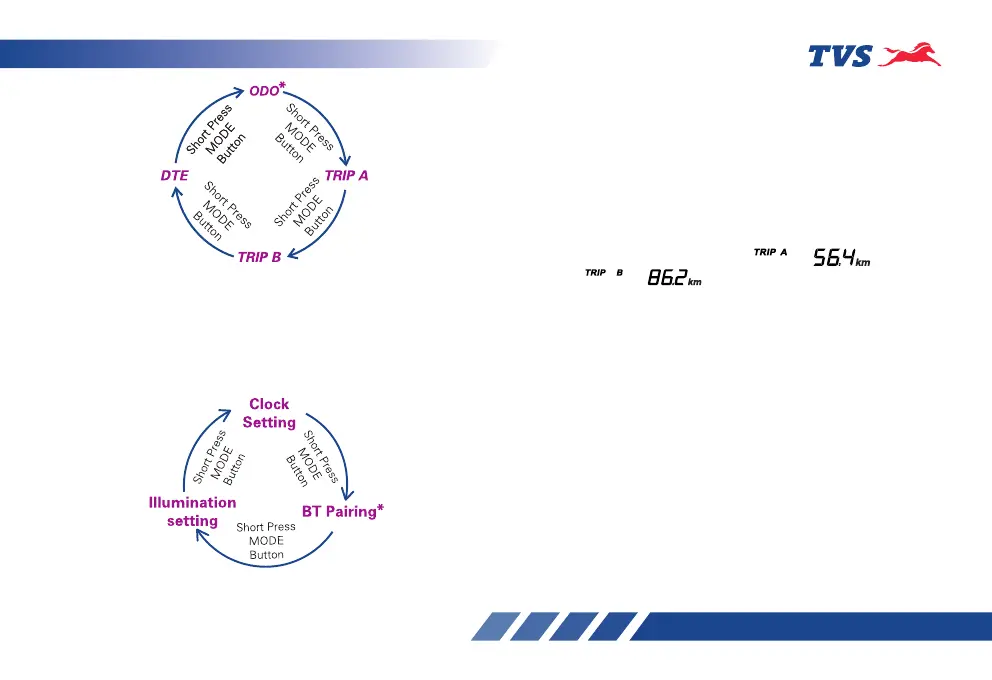
On long pressing the Mode button on any mode, the
following modes can be accessed.
1. Clock setting
2. BT Pairing*
3. Illumination setting
Setting the digital display
Every press of the ‘Mode’ button changes the display
to other mode. Follow the below procedures to
change the display to desired mode.
If ignition is turned ‘OFF’ when the meter is in ‘ODO’
or ‘TRIP’ meters, then the respective meters will be
displayed in the next ignition ‘ON’.
1. In ‘ODO’ mode, press the ‘Mode’ button once
and twice to enter ‘ ’ and
‘ ’ meters respectively.
• To reset any of the trip meter while ensuring
the display is in ‘TRIP A’ or ‘TRIP B’, press and
hold the ‘Set’ button for a few seconds.
2. In ‘TRIP B’ meter mode, press the ‘Mode’ button
once to enter ‘DTE’ mode.
• To reset ’DTE’, press and hold the ‘Set’ button
for a few seconds.
* Applicable for Connected instrument cluster version only














 To Next Page