12
setup twinkly
configurazione twinkly / configuration twinkly / twinkly einrichten /
configurar twinkly / twinkly instellen
IT
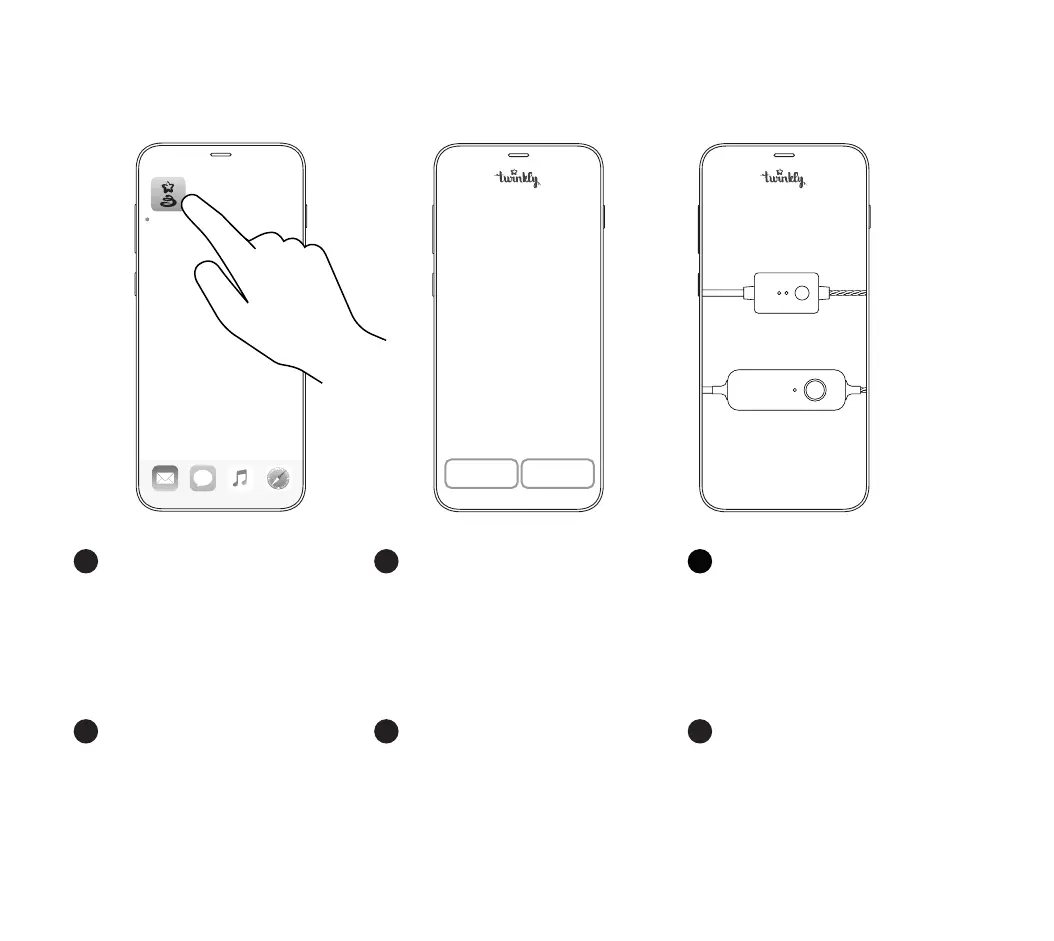
• Launch Twinkly app.
• Sign up/log in to your account (necessary for
using smart home features).
• Follow the setup process on the app.
• Starten Sie die Twinkly App.
• Melden Sie sich bei Ihrem Konto an (erforderlich
für die Nutzung der Smart-Home-Funktionen).
• Folgen Sie dem Setup-Vorgang in der App.
• Start de Twinkly-app.
• Meld u aan / log in op uw account (nodig voor het
gebruik van smart home-functies).
• Volg het installatieproces op de app.
• Lancez l’application Twinkly.
• Inscrivez-vous / connectez-vous à votre compte
(nécessaire pour utiliser les fonctionnalités Smart
Home).
• Suivez le processus d’installation sur l’application.
EN
FR
Welcome to the
world of Twinkly
Choose your controller
GENERATION I
GENERATION II
ES NLDE
Twinkly
Sign up log in
• Inicie la aplicación Twinkly.
• Regístrese / inicie sesión en su cuenta (necesario
para usar las funciones de smart home).
• Siga el proceso de conguración en la aplicación.
• Avvia l’app Twinkly.
• Iscriviti / accedi al tuo account (necessario per
utilizzare le funzionalità Smart Home).
• Segui la procedura di congurazione sull’app.


 To Next Page