Need help?
Do you have a question about the Twinkly Icicle Lights and is the answer not in the manual?
Essential safety guidelines for operating electrical products safely.
Important cautions to reduce risks of fire, electric shock, and injury.
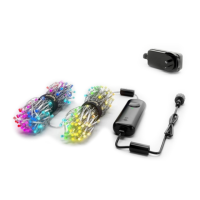
Guide to understanding the product and connecting it to a power outlet.
Instructions for connecting multiple light strings together for expanded coverage.
Explanation of the controller's button function and LED status indicators.
Guide to selecting, viewing, and applying pre-set lighting effects.
How to save preferred lighting effects for quick access later.
Steps to adjust effect parameters, colors, and save custom effects.
Steps to download and install the Twinkly application from app stores.
Instructions for connecting the Twinkly device to your Wi-Fi network.
Guide on how to launch effects, select, and play them continuously.
Guide to mapping lights on a tree for advanced lighting effects.
Tips for achieving the best results during the light mapping process.
Overview of features like local Wi-Fi, custom effects, and device grouping.
Steps to resolve common issues like lights not lighting up, network problems, or unresponsiveness.
Steps to re-scan and reconnect the Twinkly device if connection is lost.
Instructions to perform a factory reset on the Twinkly controller.
 General
| Type | Icicle Lights |
|---|---|
| Light Source | LED |
| Voice Assistant Support | Amazon Alexa, Google Assistant |
| Length | Varies by model (e.g., 5 meters, 10 meters) |
| Color Options | RGB |
| Control Method | App |
| Smart Features | Effects |
| Power Source | Plug-in |
| Water Resistance | IP44 (Splash-proof) |
| Connectivity | Wi-Fi |
| Customization | Yes (via App) |
| Number of LEDs | Varies by model (e.g., 190 LEDs) |
| App Compatibility | Twinkly App (iOS and Android) |
| Special Features | Music Sync |


 To Next Page