rescan / Neu scannen / повторно сканиране / rescan
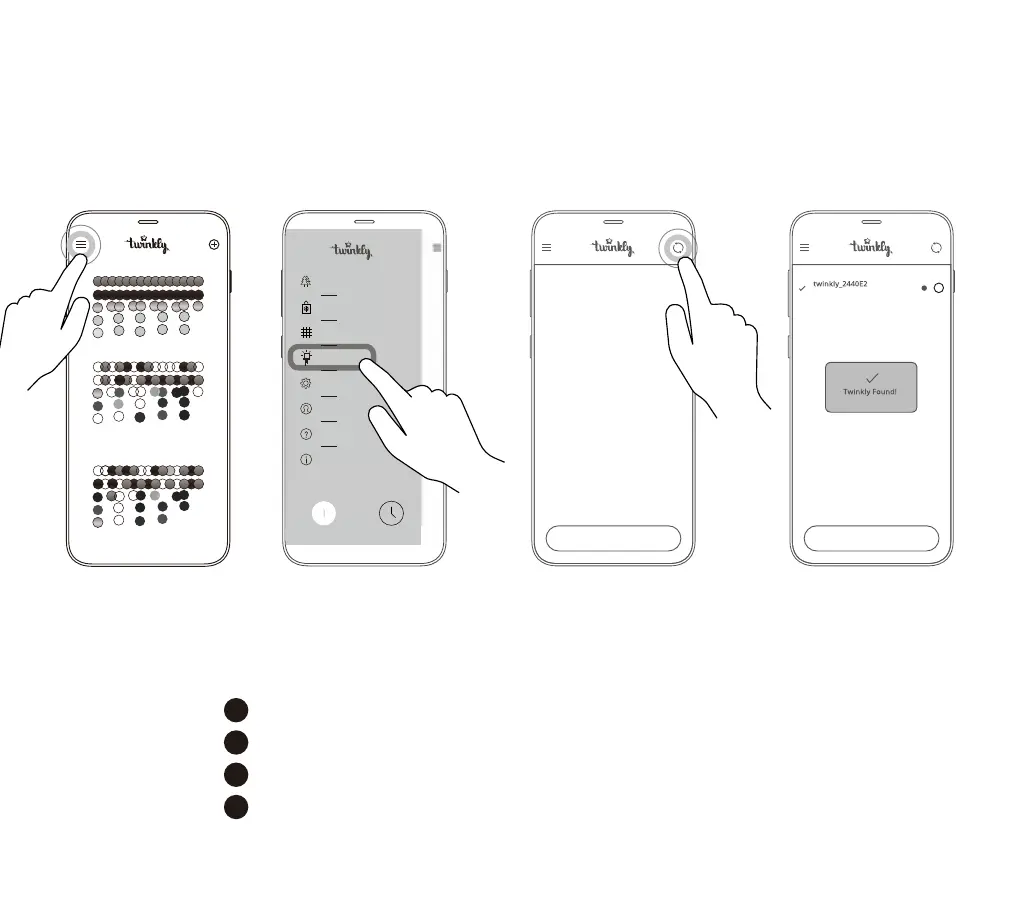
Within the menu of Twinkly app, open “Devices” and tap the “circling arrows” symbol
Öffnen Sie im Menü der Twinkly-App „Geräte“ und tippen Sie auf das Symbol mit den kreisenden Pfeilen
От менюто на приложението Twinkly отворете Devices (Устройства) и докоснете символа с „кръгови стрелки“
Din aplicația Twinkly, deschideți "Devices" și atingeți simbolul "circling arrows" [săgeți ciclare]
EN
DE
BG
RO
24
RAINBOW
BRIGHT TWINKLE
SNAKE
CREATE GROUP CREATE GROUP
175 LED
i
Effects Gallery
Layout
Devices
Settings
Account
Help
Credits
Online Store
Twinkly_xxxxxx
POWER TIMER
Light arrangements vary by models /
Lichter-Arrangements variieren ja nach Modell /
Подредбата на светлините варира според моделите /
Aranjamentele luminoase diferă în funcție de modele



 To Next Page