2020/06/26 14:07 17/35 Torpedo C.A.B. M+ User's Manual
User's manuals - https://wiki.two-notes.com/
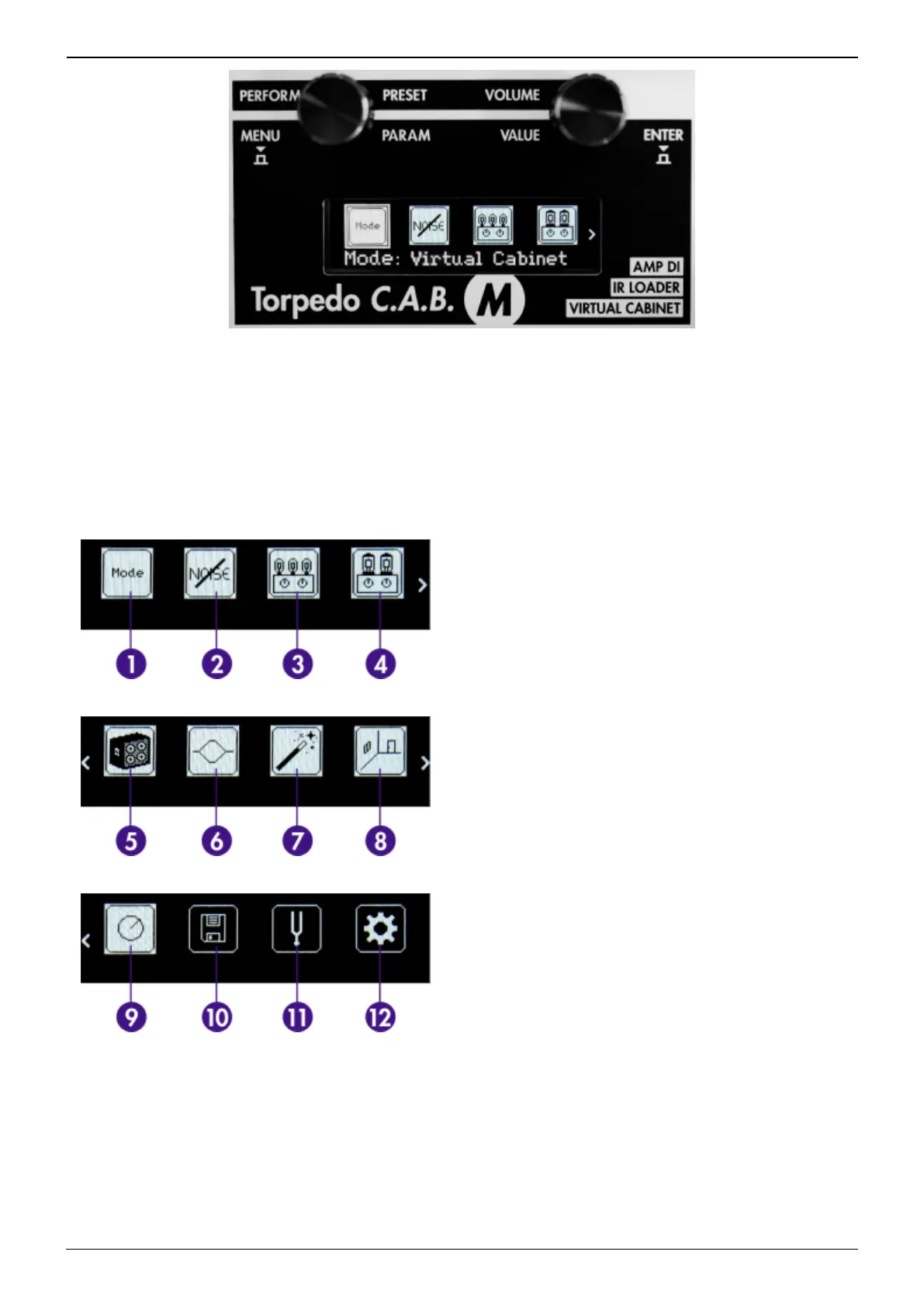
To enter any section and edit the related parameters, scroll to the relevant section by turning the
PARAM encoder and press ENTER to enter. Some sections can be modified directly without entering it,
by turning the VALUE encoder. For most of them, this means turning it ON or OFF (the image will then
appear in negative mode).
There are 12 sections in the MENU environment:
1. Mode
2. Noise Gate
3. Preamp
4. Power Amp
5. Miking
6. EQ
7. Enhancer
8. Reverb
9. Preset Level
10. Save
11. Tuner
12. Global
4.3.1 Virtual Cabinet Mode
The Virtual Cabinet mode is dedicated to Two notes Virtual Cabinet. You will create your preset(s) and
edit every parameter available with one Virtual Cabinet.
A preset contains:


 To Next Page