3
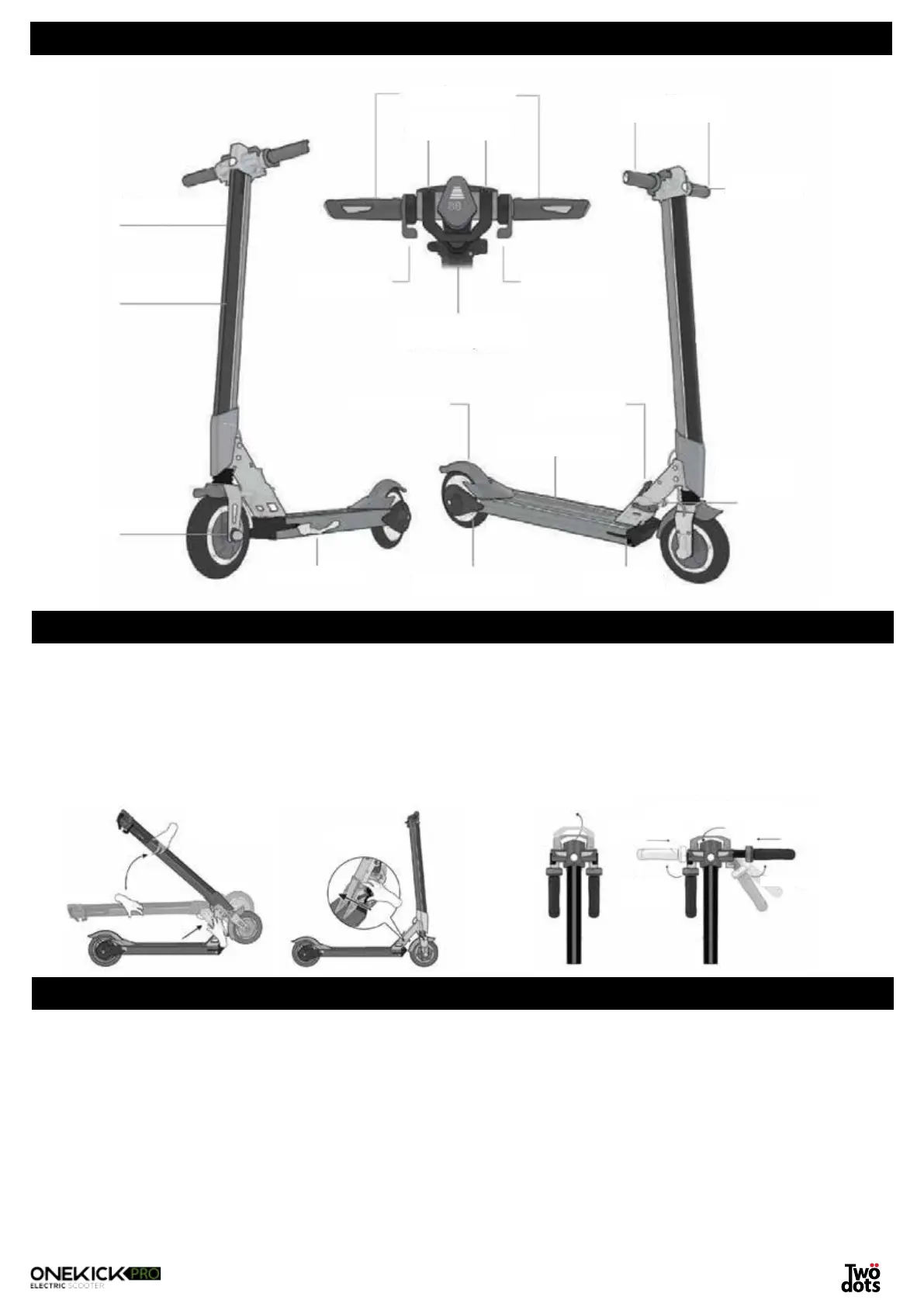
COMPONENTS
UNFOLDING/FOLDING THE E-SCOOTER
1. Release the locking lever and push the unlocking button while you lift the steering rod until you hear a click as
it locks into place. Close the locking lever.
2. Lift the fixing lever on the steering rod up and open the handlebars. Push the handles inwards and lock into
place by pushing the fixing lever down. Make sure the steering rod has been locked correctly into place.
3. Release the lever on the steering rod to regulate the height. Once you have set the desired height, lock it into
place with the quick fixing lever.
CHARGING THE BATTERY
Kindly charge the battery completely before first use. Insert the charger cable on the front right of the platform.
While charging, the LED light will be red. Once the battery has been fully charged, the LED lights will turn green.
A full charge will take about 3-4 hours.
WARNING
• Reduced battery autonomy in winter is perfectly normal since the battery performance decreases in cold
weather.
• Store the product with the charged battery. Leaving the product with discharged battery or with battery level
close to 0% over long periods of time may cause damage to the battery. Recharge the device at least once
Easy grip handles
Folding T-bar latch
Throttle button
Release button
Charging port
Rear hub LED lights
Throttle sensor deck
Folding
lock
lever
Electric brake
Handlebar stem
10° expandable
handlebar
LCD display for speed and
battery life
Kickstand
Rear footbrake
Brushless motor hub
Folding handlebars
LED headlight
Unfold handlebar
Push handlebar inPush handlebar in
Open folding T-bar latch
Bring folding T-bar latch back
to original position
Unfold
handlebar


 To Next Page