D4OPTRS 54 2019
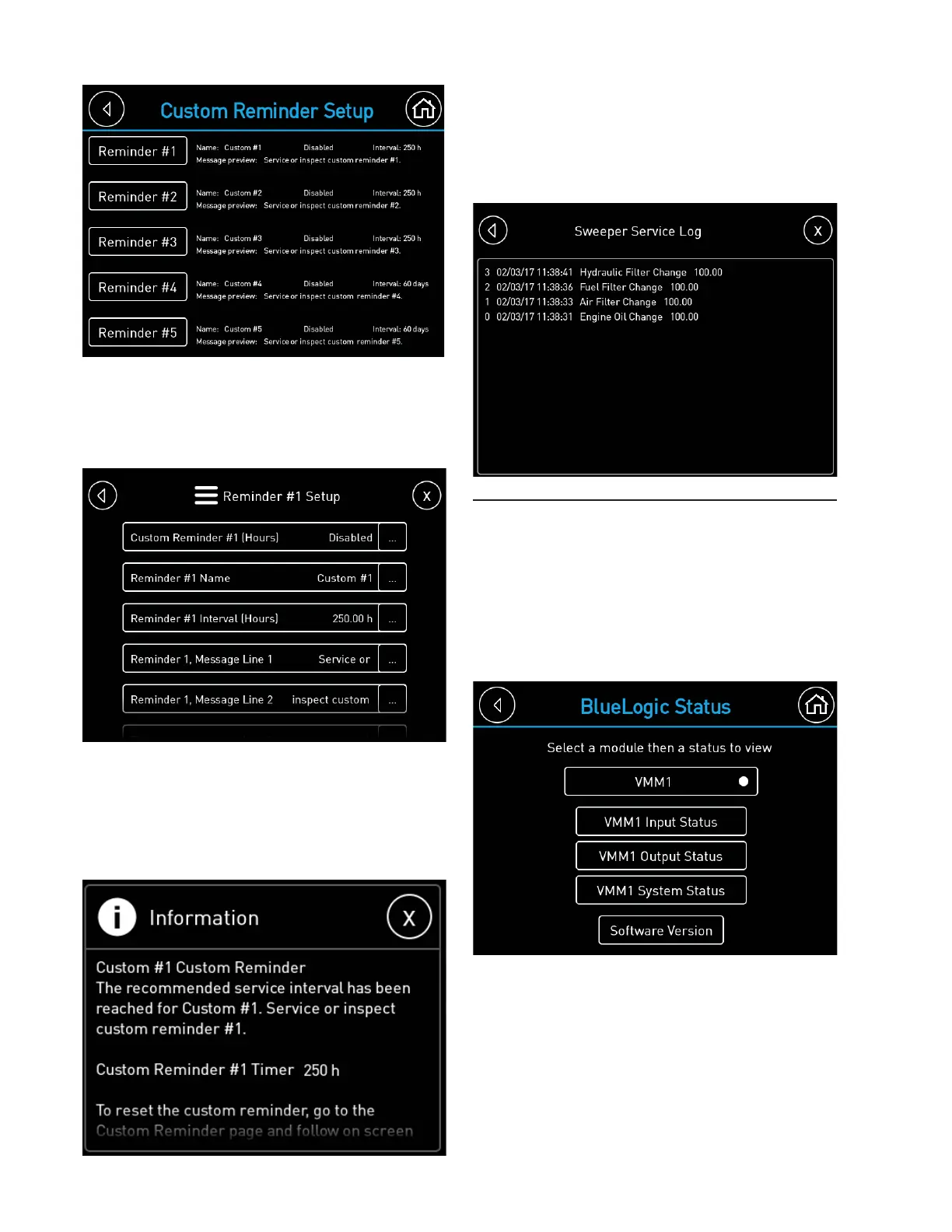
BlueLogic Status
The status of the BlueLogic module (VMM)
can be viewed on the VMM status page.
The status mimics the diagnostic lights on
the face of the VMM. VMM inputs, outputs,
system status, and software version can
be viewed by pressing the corresponding
function key.
Each time a service timer is reset, it will be
recorded in the Sweeper Service Log. The
engine hours at the time of the service will
be recorded. The log can be accessed by
pressing the Service Log button on the main
Hour Meters page.
To confi gure a reminder, press the
corresponding Reminder # button to access
the adjustable fi elds. Once the reminder
is enabled, it will show up on the Custom
Reminder page.
When the custom reminder service interval is
reached, the custom reminder message will
pop up with the custom message inserted. To
reset the custom reminder, go to the Custom
Reminder page and reset using the same
procedure and the standard reminders.


 To Next Page