SHORTCUT MAP
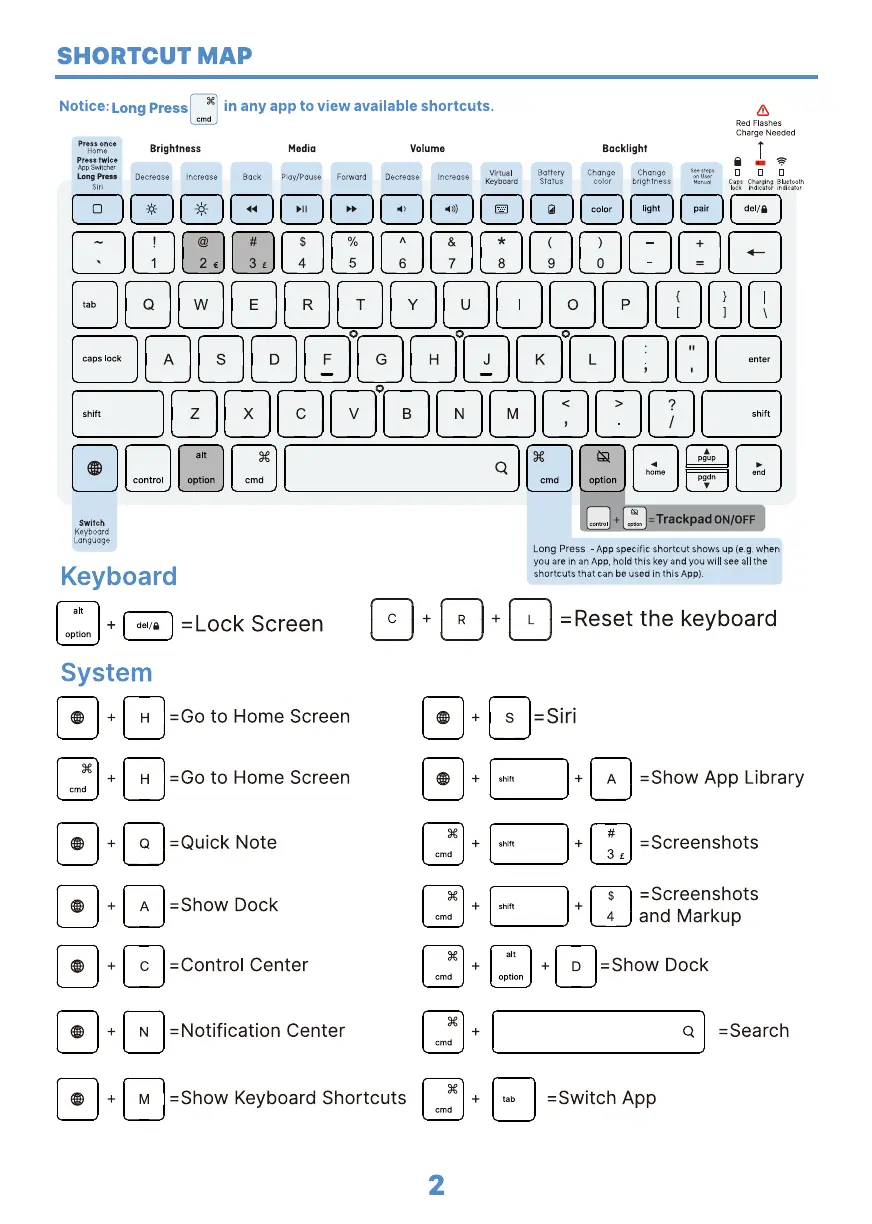
Notice: Long Press
in any app to view available shortcuts.
Red Flashes
Charge Needed
Press once
Home
Press twice
App
Brightness
Media Volume
Backlight
Battery Change Change
Virtual
Ploy/pouse Forward Decrease
Long Press Decrease Increase Back Increase
Status color
brightness
Key rd
Switch
Keyboard
Language
Keyboard
System
cmd
H
H
Q
-Lock Screen
-Go to Home Screen
-Go to Home Screen
-Quick Note
-Show Dock
-Control Center
-Notification Center
-Show Keyboard Shortcuts
cmd
2
Trac ad ON OFF
Long Press - App specific shortcut shows up (e.g.when
you are in an App, hold this key and you will see all the
shortcuts that can be used in this App)_
-Reset the keyboard
s -Siri
-Show App Library
-Screenshots
-Screenshots
4 and Markup
+ D -Show Dock
Q
-Switch App
-Search
tab


 To Next Page