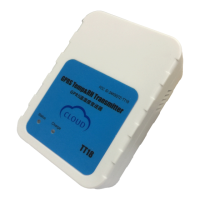
Tzonedigital_TT18 V2.1 Apr27, 2017
Configure or charge the machine
Turn on the unit or to know the machine’s status with press
When pressing the button after 5 seconds left or set 005
command by serial port ( in turn off /flight mode, note:
need pressing the button for 15s in flight mode)
Only set 005 command can let the device turn off ( in turn
on/flight mode,note:set 005 command only by serial port in
Flight mode)
When pressing the Button for 15s or set 005 command,only
save and not sending data in this mode ( in turn on/turn off
mode, note: set 005 command only by serial port in turn off
mode)
Note: The A1 Red+Green LEDs of the device will blink at the same time when
the machine is boot. If you’d like to know the device’s status, you need to press
the button after 0.5 seconds left, then the led will show to you which status in
now and the LED only last 10s every time. If the device status led is off , the
mean is the device is off, There is priority of the device’s status, the greater
number, the higher priority, flashing as follows:
A1.Green+Red LED - indicating the device status
Green and Red led each on 0.1 seconds
Green On for 0.1 seconds and off for 0.1
seconds
Red On for 0.1 seconds and off for 0.1
seconds
Device have problem (no
signal and can’t send data
to server)
Green On for 1 seconds and off for 1
seconds


 To Next Page