PAGE 1 OF 3 0721 IH-1886
π H-1886
INDUSTRIAL
LAMINATOR
1-800-295-5510
uline.com
INSTRUCTIONS
Before operating the laminator, please review the
following guidelines.
1. Determine the correct temperature setting for the
pouch you intend to laminate.
2. Set temperature control to the prescribed setting.
NOTE: For first time operation, set the
temperature to the lower end of the
recommended temperature range and test
lamination. If the pouch is not properly sealed,
the temperature can be raised slightly and
the pouch can be reprocessed at the higher
temperature. If the temperature is set too high,
the pouch and/or item being laminated may
be damaged.
3. Turn GREEN POWER switch ON. Allow the laminator
to warm up for approximately ten minutes. Once
laminator's temperature is ready, the AMBER
READY/RUN switch light will begin to blink indicating
the laminator is ready to laminate.
4. Place the item to laminate into the pouch. Then
place the pouch into the cardboard carrier.
5. Press the AMBER READY/RUN switch ON. The motor will
engage and the rollers will begin turning.
6. Insert the carrier into the front opening of the
laminator. Insert the carrier lengthwise, folded edge
first, straight into the opening.
7. The carrier will exit the rear of the laminator when the
process is completed.
POUCH / TYPE SETTING
3 MIL Pouch With Carrier #1 to #2
5 MIL Pouch With Carrier #2 to #3
7 MIL Pouch With Carrier #3 to #4
10 MIL Pouch With Carrier #3 to #4
NOTE: Start at the lowest temperature.
WARNING! For your protection, do not
connect the laminator to electric power
until you read these instructions.
Para Español, vea página 2.
Pour le français, consulter la page 3.

 Need help?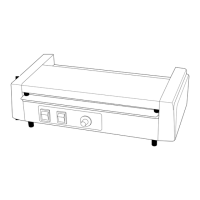

 To Next Page
 General