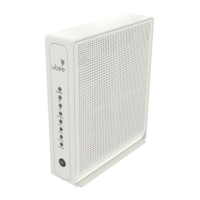
ON - Internal power-on completed successfully.
FLASHES - Initializing.
OFF - No power supplied.
FLASHES - Once every second when DS scan is in progress and when a firmware upgrade is in progress.
ON - Locked to DS channels and registered with the CMTS.
FLASHES - Once every second when US scan is in progress and when a firmware upgrade is in progress.
ON - Locked to US channels and registered with the CMTS.
FLASHES - Obtaining IP address and configuration file.
ON - Configuration completed successfully, network connected.
OFF - Network connect failed.
ON - Telephony is enabled and telephone is on-hook.
OFF - Telephony is not provisioned.
FLASHES - Call is in progress or eMTA is attempting to register.
ON - Telephony is enabled and telephone is on-hook.
OFF - Telephony is not provisioned.
FLASHES - Call is in progress or eMTA is attempting to register.
FLASHES - 2.4GHz WiFi traffic is being passed.
ON - 2.4GHz WiFi is enabled.
OFF - 2.4GHz WiFi is disabled.
FLASHES - 5GHz WiFi traffic is being passed.
ON - 5GHz WiFi is enabled.
OFF - 5GHz WiFi is disabled.
ETHERNET
1-4 (rear panel)
ON GREEN - An Ethernet device is connected to the UBC1310BA10 at 1000 Mbps speed.
ON ORANGE - An Ethernet device is connected to the UBC1310BA10 at 10/100 Mbps speeds.
FLASHES (GREEN or ORANGE) - Data is being passed between the UBC1310BA10 and the connected Ethernet
device.
✴ Please note that both the 2.4GHz and
5GHz radios are enabled by default.
UBC1310BA10 Quick Installation Guide


 To Next Page