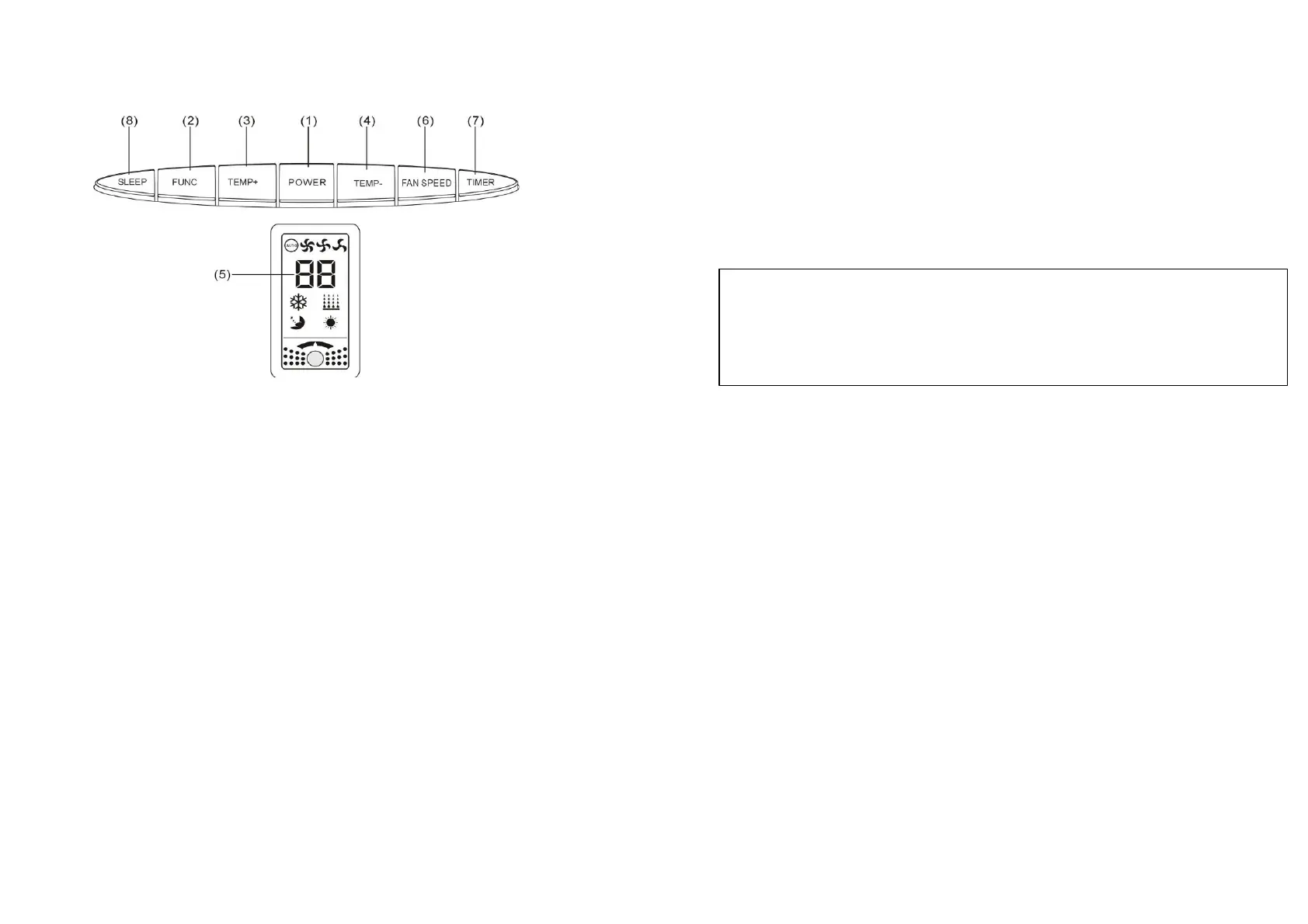
CONTROL PANEL & DESCRIPTION
OF FUNCTIONS
※
The
time
required
to
reach
the
desired
set
temperature
will
depend
on
the
environment
and
the
area
in
which
the
unit
is
operating
in.
For
example,
if
the
ambient
temperature
is
too
hot
or
the
room
is
too
large,
the
cooling
may
be
less
effective
and
it
will
take
more
time
to
reach
the
set
temperature.
5.
LED
DISPLAY
Indicates
the
temperature
or
the
time
setting.
After
any
time
set
the
display
will
return
to
the
preset
set
temperature.
Error Display
E1: Indicates open circuit or short circuit in room
temperature sensor.
E2: Indicates open circuit or short
circuit in pipe temperature sensor.
E7: Indicates the
water container is full.
1.
POWER
KEY
Press to turn unit "ON" or "OFF".
2.
FUNCTION
Press this key to select COOLING, HEATING, DEHUMIDIFICATION or FAN.
※
In dehumidifying mode, when “dh” is displayed, temperature cannot be set.
※
In fan mode, when “FF” is displayed, temperature cannot be set.
※
When in standby mode( off mode), press [mode] (function key) for 10 seconds
to switch temperature from Celsius to Fahrenheit . (note: default setting is
Celsius)
3.
TEMP+
This
button
raises
the
set
temperature
by
1°C
each
time
it
is
pressed,
to
a
maximum of
30°C
(90°F)
.
4.
TEMP-
This
button
lowers
the
set
temperature
by
1°C
each
time
it
is
pressed,
to
a
minimum
of
17°C
(65°F)
Please check with Troubleshooting guide on page 14 if any of the above error
messages are shown.
6.
SPEED
Press to select either LOW, MEDIUM, HIGH or AUTO fan speed.
If "AUTO" is selected, the unit will choose to operate at maximum, middle or minimum fan speed
automatically, according to the difference between room temperature and setting temperature.
If "HIGH" is selected, the unit operates at maximum cooling capacity no matter what the setting
temperature is. The "MEDIUM" OR “LOW" comes to the same. Automatically setting
Dehumidify function: fan speed at LOW. Heating function: fan speed at LOW, MEDIUM, HIGH.
7.
PROGRAMMABLE
TIMER
Programmable timer ON/OFF key.
TIMER-ON: The timer-on is used to turn on the unit automatically after the set time is over.
(Timer-on key correspond to the functional indicator light)
1. Press "Timer"key at stand-by status(off mode) to set the time. After setting the time, then
choose the function you need.(cooling, heating, dehumidifying, and fan mode(FF).)
2. Once the set hour has come to an end, the unit will turn on automatically.
3. Press the "POWER" key before time out, the set time will be cancelled and the unit will turn on.
※
After time setting, displaying time will flash for seconds. Please choose the function after the
flashing is stopped.
5 6




 To Next Page