
EasyManua.ls Logo

udir/c U12S - User Manual

udir/c U12S
6 pages
Print Icon
To Next Page IconTo Next Page
Loading...
2
USER
MANUAL
U12S
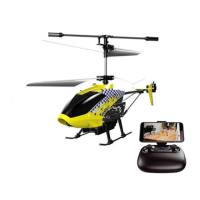
This helicopter can aerial photography and
transmitted in real time image.
This product is suitable for users over 14 years old.
Stay away from the rotating propeller
Read the<important statement and safety guidelines >carefully.
Helicopter preparation
Tail Propeller
Balance Bar
Upper Propeller
Lower Propeller
Camera
Power Switch
Battery Slot
Battery Jack
Navigation Lights
Battery power is insufficient in the original plant.
It must be charged saturated before it can be used.
Connect the battery of the helicopter with the charging cable configured in
the original factory, and then connect it to other USB charging ports.
The indicator light of USB charger is red when charging.
And the light turns green when fully charged.
Ready before take off
Charging Instruction

Questions and Answers

Summary

U12 S Helicopter Setup Guide

Helicopter Component Identification

Identifies key parts of the helicopter for preparation, including propellers and lights.

Charging Helicopter Battery

Instructions for charging the helicopter's power source and indicator light behavior.

Essential User Safety Precautions

Critical safety advice including age limits, propeller hazards, and reading guidelines.

Initial Setup and Installation

Helicopter Battery Installation Steps

Guide on inserting the battery into the helicopter body and connecting the jack.

Transmitter Battery Insertion

Process for placing batteries into the remote controller following polarity indicators.

Mobile Phone Mount Configuration

How to attach the phone holder and secure a smartphone for control without blocking buttons.

Flight Operations and Control

Connecting App and Transmitter

Steps for app download, pairing the transmitter to the helicopter, and connecting the phone.

Understanding Control Stick Inputs

Detailed explanation of left and right stick movements for controlling ascent, descent, and direction.

Initiating and Ending Flights

Procedures for taking off, flying at altitude, and landing the helicopter safely.

Advanced Flight Features and Modes

Emergency Stop and Handling

Instructions for using the emergency stop function and related tips for safe operation.

Photography, Video, and Speed

Guide to capturing media, storing files, and adjusting flight speed settings.

Trimming, Calibration, and Hover

Procedures for flight trimming, gyroscope calibration, and altitude hold functionality.

Low Battery Warning System

How the system alerts users to low battery levels on the transmitter and helicopter.

Technical Specifications and Troubleshooting

Product Technical Details

Comprehensive specifications for the drone, transmitter, app, camera, and charger.

Resolving Common Operational Issues

Solutions for typical problems like controller light issues, pairing failures, and low power.

Troubleshooting, Compliance, and Notices

Advanced Troubleshooting Scenarios

Solutions for more complex flight and performance problems like hovering issues and control difficulties.

FCC Compliance and RF Exposure

Information regarding regulatory compliance, interference, and radio frequency exposure.

Battery Care and Important Disclaimers

Guidelines for Li-Po battery disposal and general product improvement and accuracy notices.

Overview

The UDIRC U12S is a user-friendly helicopter designed for aerial photography and real-time image transmission. It is suitable for users over 14 years old and emphasizes safety with warnings to stay away from rotating propellers and to carefully read important statements and safety guidelines.

Function Description:

The U12S helicopter is equipped with a camera for aerial photography and video recording, transmitting real-time images to a connected smartphone. It features an Altitude Hold Mode for stable hovering, making it easier for beginners to control. The helicopter is controlled via a transmitter that connects to a smartphone running the "Flyingsee" app, available for both iOS and Android systems. The app provides detailed operation instructions and allows users to view photos and videos stored in the phone's local gallery.

Important Technical Specifications:

  • Helicopter Model: U12S
  • Weight: 70.6g (Typical value)
  • Flight Altitude Limit: 15m
  • Flight Time: 6 minutes (Calm)
  • Operating Temperature Range (Helicopter): 0°C to 40°C
  • Operating Frequency (Helicopter): 2.4Ghz / 2.4G wifi
  • Flight Battery: LiPo, 350 mAh, 3.7 V
  • Charging Temperature Range (Battery): 5°C to 40°C
  • Charging Time (Battery): About 80 minutes
  • Transmitter Operating Frequency: 2.4Ghz
  • Transmission Distance: 30 m (No interference)
  • Transmitter Operating Temperature Range: 0°C to 40°C
  • Transmitter Battery: 4×1.5 V Alkaline AA batteries
  • Image Resolution: 640x480p
  • Video Resolution: 640×480p
  • Real-time Image Transmission: 480p@20 fps
  • Image Format: JPEG
  • Video Format: MP4, H.264
  • Charger Input: 5V 2A

Usage Features:

  • Preparation: Before first use, the helicopter battery must be fully charged. The transmitter requires 4x1.5V AA batteries.
  • Mobile Phone Installation: A phone clip on the transmitter allows for secure attachment of a smartphone. The clip is designed to hold the phone without pressing side buttons.
  • App Download: The "Flyingsee" app is required for smartphone connectivity and advanced features.
  • Frequency Pairing: The helicopter and transmitter are paired by powering on the transmitter, pulling the left stick down and releasing it, then powering on the helicopter. Successful pairing is indicated by navigation lights.
  • Control Stick Operation:
    • Left Stick: Controls vertical movement (Go Up/Go Down) and rotation (Counterclockwise/Clockwise turn).
    • Right Stick: Controls forward/backward movement and left/right turns.
  • Take Off/Landing: A dedicated button initiates automatic take-off to an altitude of about 1.2m and slow, controlled landing. Manual left stick operation during landing is discouraged.
  • Emergency Stop: Pressing the "take off/land" button for 2 seconds initiates an emergency stop, causing the helicopter to crash directly. This function should only be used in emergencies.
  • Photo/Video: Dedicated buttons on the transmitter allow for taking pictures and starting/stopping video recording when connected to a smartphone. Photos and videos are saved to the phone's gallery.
  • Speed Mode Switch: The "H/L" button toggles between Low Speed (suitable for beginners without wind) and High Speed (for skilled users or outdoor wind resistance).
  • Flying Trimmer: Allows for fine-tuning the helicopter's rotation if it drifts left or right during flight.
  • Calibration: If the helicopter exhibits abnormal flying behavior, a calibration procedure can be performed by pushing the right stick to the lower right corner (45°) until the navigation lights flash.
  • Altitude Hold Mode: An intelligent flight control system maintains hovering position automatically, enabling single-hand operation. This mode may fail if propellers are damaged or in unstable atmospheric conditions.
  • Low Battery Alarm: Both the transmitter and helicopter provide audio alerts when their batteries are low, prompting the user to return and replace/recharge batteries.
  • Out of Range Alarm: The transmitter sounds an alarm when the helicopter goes out of remote control distance.

Maintenance Features:

  • Charging: Use the original charging cable and a 5V 2A USB adapter. The charger indicator is red during charging and turns green when fully charged.
  • Troubleshooting: The manual provides solutions for common issues such as the controller indicator light being off (low battery, incorrect battery installation), failure to pair the drone (mis-operation, interfering signal, damaged electronic components), and flight performance issues (deformed propeller, low battery, incorrect propeller installation, main bearing damage, improper calibration, gyroscope reset failure, motor damage, unstable atmospheric pressure).
  • Propeller Replacement: If propellers are seriously deformed, they should be replaced.
  • Battery Replacement: If the battery is expired or has over-discharge protection, it should be replaced.
  • Li-Po Battery Disposal & Recycling: Wasted Lithium-Polymer batteries must not be disposed of with household trash. Users are advised to contact local environmental agencies or recycling centers.
  • General Attention: Always turn on the transmitter first, then the helicopter, and turn off the helicopter first, then the transmitter. In case of a crash, check the motor, propeller, and battery connections for damage and replace any necessary parts.

udir/c U12S Specifications

General IconGeneral
Brandudir/c
ModelU12S
CategoryToy
LanguageEnglish