21
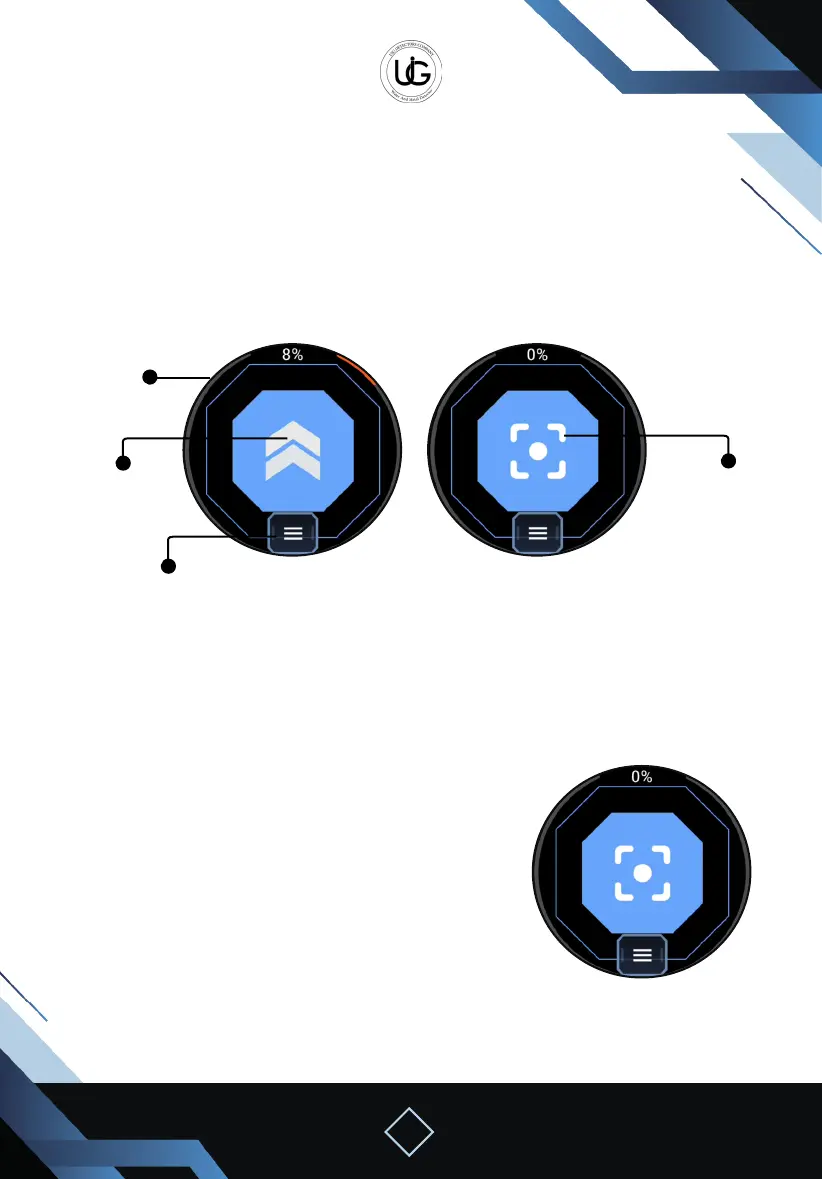
Upon completion of the calibration, the following elements will appear on the screen:
Percentage: to know the percentage of search progress.
Arrow’s direction: to know the direction of the next step.
In manual scan mode, th e capture button will appear in the middle of the screen.
Menu Icon: containing a button to turn o the screen while keeping the search mode
active, and a button to exit the search.
To start the imaging process:
Take equal steps while pointing to the arrow’s direction to determine the steps.
In automatic mode: the image will be captured automatically with each step, and you
should move one step and wait for the device to capture the image with a capture sound.
Menu Icon
Percentage
Arrow’s direction
Capture Button
Manual mode
In manual mode: you should stop and press the capture
button on the watch with each step.
Upon completion of the search, a message will appear to
save or ignore the search.
If saved, the search result will be saved on your mobile
phone for later analysis, accessible from the application’s
home page under the “Open” icon, with the le name
“Watch” along with the time and date of saving.


 To Next Page
 Loading...