EasyManua.ls Logo

ULTRA BRIGHT SOLAR POST CAP - User Manual

ULTRA BRIGHT SOLAR POST CAP
2 pages
Print Icon
To Next Page IconTo Next Page
Loading...
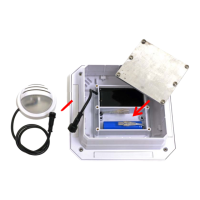
Useascrewdrivertoremovethebatterycover
&connectthebattery&separatelight:NOTE:
Aligntheconnectorsbeforejoining.
Ensurethesiliconepadisunderthebatterycover
andreinstallthecoverinplace.Tightenallscrews
toensureawaterproofseal.
SOLAR POST CAP
4
UltraBrightTech
P.O.Box414
105W.SimonSt.
Laotto,IN46763
Phone:2609182758
Fax:2609183540
Emailsales@ultrabrighttech.com
Web:www.ultrabrighttech.com
3
2
PhillipsScrewdriver
Markholesonthepostforbothpostcapand
separatelight.Useanappropriatedrillbitto
makeasmallpilotholefortheprovidedscrews.
Usetheprovidedscrewstosecureyoursolar
postlighttothepost.
PhillipsScrewdriver
1
½”Holefor
wire&
connector
Smallpilotholesfor
mountingscrews
Mountat
desired
height
Question and Answer IconNeed help?

Do you have a question about the ULTRA BRIGHT SOLAR POST CAP and is the answer not in the manual?

Summary

Solar Post Cap Installation

Battery Connection and Sealing

Connect the battery and ensure a waterproof seal by properly installing the battery cover and tightening screws.

Post Mounting and Securing

Mark the post, drill pilot holes for mounting screws, and use provided screws to secure the solar post cap.

Solar Post Cap Operation and Support

Brightness Level Adjustment

Use a magnet to change brightness levels and turn the light off by swiping the solar panel.

Color Changing Feature

Cycle through White, Blue, or Amber LED colors by holding the magnet on the solar panel activation area.

Product Warranty and Registration

Details the 1-year limited warranty, registration process, and warranty terms for the solar post cap.

ULTRA BRIGHT SOLAR POST CAP Specifications

General IconGeneral
BrandULTRA BRIGHT
ModelSOLAR POST CAP
CategorySolar panel
LanguageEnglish