Model 1101-Operation Guide
281 Douglas Road East, Oldsmar, FL 34677
&OHDQHU)DVWHU%HWWHU
www.UltraCleanSystems.com
Page 2 of 3
Toll Free: 877-935-6624
Fax: 813-925-1044
Model 1101 - Operation Guide
Turn on the main power switch. 5.
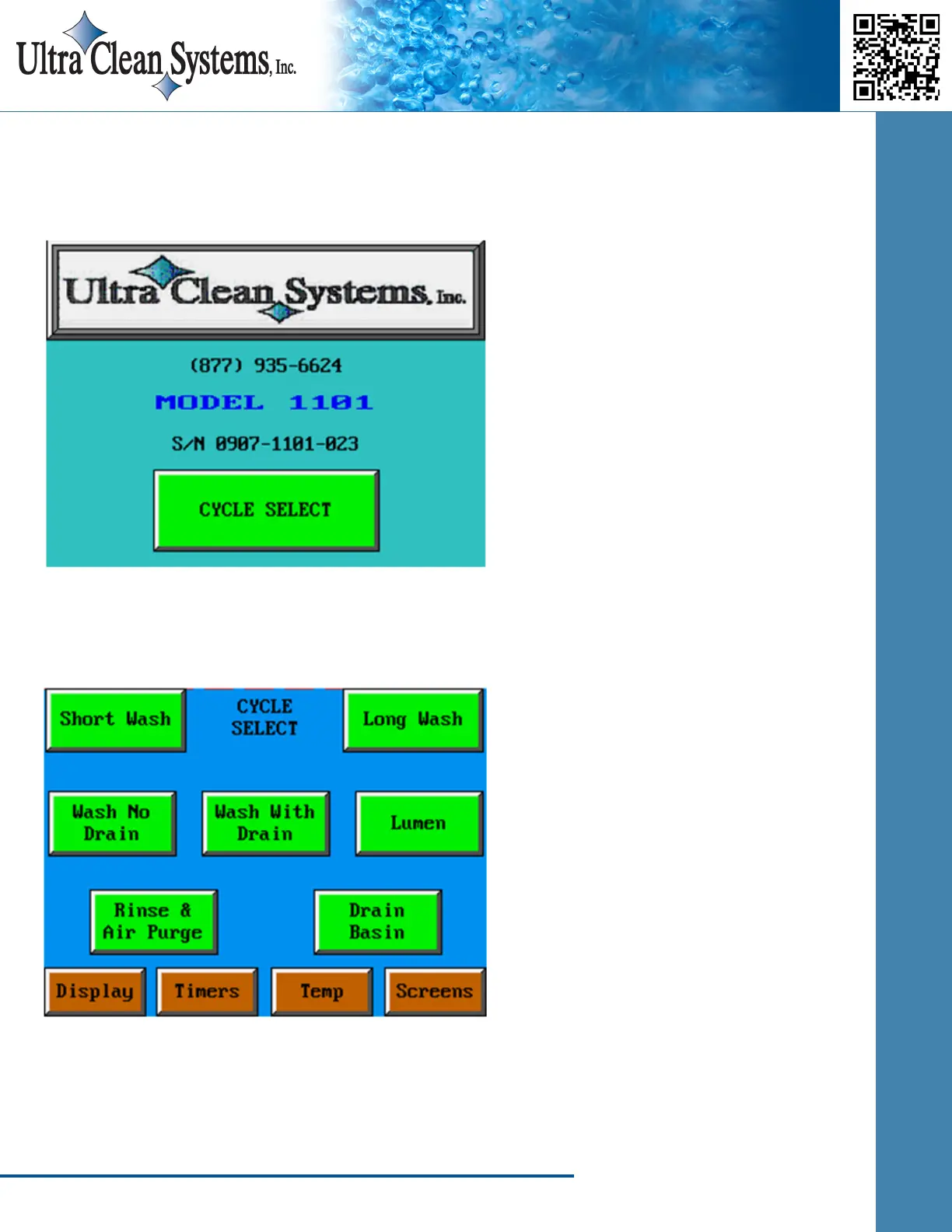
Push the CYCLE SELECT button to get to the Cycle Select screen. 6.
Choose either Short Wash or Long Wash. 7.
Short Wash = PLQXWHVRIXOWUDVRQLFWLPH
Long Wash = PLQXWHVRIXOWUDVRQLFWLPH
NOTE: Long Wash is recommended for heavily soiled instruments, orthopedic instruments,
and robotic instruments. ,IWKHGHSDUWPHQWGLGQRWKDYHDQ\XOWUDVRQLFPDFKLQHSUHYLRXVO\LW
PD\EHQHFHVVDU\WRXVHWKH/RQJ:DVKF\FOHGXULQJWKH¿UVWIHZZHHNVRIXVH


 To Next Page