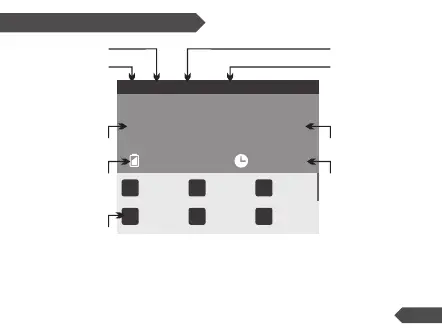
Rotating the roller wheel up or down during charging will switch the information
displayed on the lower half of the LCD screen between cell voltage, cell IR and
working parameters. Cell voltage and IR can only be displayed during the balance
charging process.
Cell Voltage
Charge/Discharge
Time
Charge/Discharge
Current
Battery Percentage
Working Mode
Battery Cell Count
Battery Capacity
Battery Voltage
Battery Type
Li Po - 6S C ha r ge .. . 96 %
25.0V
16.0A
13 0 00m A h
1
4
2
5
3
6
4. 1 7V
4. 1 6V
4. 1 7V
4. 1 7V
4. 1 6V
4. 1 7V
0: 5 0:0 0
Working Parameters Display
12


 To Next Page