
 Need help?
Do you have a question about the UMAX Technologies U-Box A9 and is the answer not in the manual?
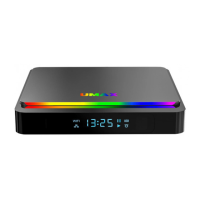
Identifies front and rear connections including HDMI, LAN, USB, AV, Optical, and MicroSD ports.
Details functions of remote control buttons: power, playback, navigation, volume, air mouse, and programmable keys.
Guides through connecting TV, Network, Power, and setting up the remote control.
Explains automatic power-on after connection and manual power-on via remote control.
Covers handling, liquid exposure, charging, medical device interference, motion, choking, and atmospheric hazards.
Provides phone, email, web, and physical address for support and manufacturer details.
 General
| Wi-Fi | 802.11 b/g/n |
|---|---|
| Video Output | HDMI |
| Audio Output | HDMI |
| Card Reader | MicroSD |
| USB | USB 2.0 |
| Ethernet | 10/100M RJ45 |
| Supported Video Formats | AVI, MKV, MOV |
| Supported Audio Formats | MP3, WMA, AAC, FLAC, OGG |
| Supported Image Formats | JPEG, BMP, PNG, GIF |
| Power Supply | 5V/2A |

 To Next Page