The UMAX U-Box N41 is a mini-PC designed for various computing tasks, offering expandability and a compact form factor. It is suitable for both personal and professional use, with features that allow for extended storage and flexible mounting options.
Technical Specifications
Operating Environment:
- Operating temperature: 10° to 35° C
- Storage temperature: -25° to 45° C
- Relative humidity: 0% to 90% (noncondensing)
Ports and Connectors:
The device features a comprehensive set of ports for connectivity and peripherals:
- Front/Side:
- Micro SD card slot
- USB 3.0 port
- USB 3.0 port
- Power button
- Rear:
5. Power input
6. USB 3.0 port
7. HDMI port
8. LAN (Ethernet) port
9. Headphones + microphone jack
10. VGA port
11. M.2 SATA SSD 2242 slot (for storage expansion)
Usage Features
Getting Started:
To turn on the computer, simply press the power button located on the front/side of the device.
Extending Storage:
The U-Box N41 allows for easy storage expansion by adding an M.2 SATA SSD 2242. This is a straightforward process:
- Remove all four rubber legs from the bottom case of the mini-PC.
- Unscrew the four screws located under the rubber legs on the bottom case.
- Carefully insert your M.2 SATA SSD 2242 into the designated slot.
- Secure the SSD in place with a screw.
- Reattach the bottom case with the four screws and then replace all the rubber legs.
It is important to note that you might need to format the new drive before it can be used.
Installing VESA Mount:
The mini-PC can be mounted on the back of an LCD screen using the included VESA mount. This feature helps save desk space and provides a clean setup.
- Attach the VESA mount to the back of your LCD screen using two screws.
- Hang your mini-PC onto the VESA mount.
Working with Windows® 10 (Keyboard Shortcuts):
The U-Box N41 runs on Windows 10 and supports various keyboard shortcuts to enhance productivity:
- Windows key: Launches the Start menu.
- Windows key + A: Launches the Action Center.
- Windows key + D: Launches the desktop.
- Windows key + E: Launches the File Explorer.
- Windows key + I: Launches Settings.
- Windows key + K: Launches the Connect panel.
- Windows key + L: Activates the Lock screen.
- Windows key + M: Minimizes all currently active windows.
- Windows key + S: Launches Search.
- Windows key + P: Launches the Project panel.
- Windows key + R: Opens the Run windows.
- Windows key + U: Opens Ease of Access Center.
- Windows key + X: Opens the context menu of the Start button.
- Windows key + Plus sign (+): Launches the magnifier icon and zooms in your screen.
- Windows key + Minus sign (-): Zooms out your screen.
Windows 10 Tips:
The Tips app in Windows 10 provides short and useful tips to help users get the most out of the operating system. To access it, select the Start button, type "tips," and then select "Tips" from the search results.
Maintenance Features
Safety Information:
Adhering to safety guidelines is crucial for the longevity of the device and user safety.
- Built-in battery: Do not attempt to replace or remove the battery yourself, as this can cause damage, overheating, and injury. The battery should only be replaced by an authorized service provider and must be recycled or disposed of separately from household waste.
- Handle with care: The device contains sensitive electronic components. Always place it on a stable work surface that allows for adequate air circulation. Avoid dropping, burning, puncturing, crushing, or exposing it to liquids, oils, and lotions, as this can damage the computer and cause injury. Do not use a damaged computer.
- Liquid exposure: Keep the computer away from all sources of liquid, including drinks, oils, lotions, sinks, bathtubs, and shower stalls. Protect it from dampness, humidity, and wet weather conditions like rain, snow, and fog.
- Charging: Only use the included power adapter for charging. Other adapters may not meet safety standards and could pose risks of death or injury. Avoid using damaged power adapters or cables, or charging in moist conditions, as this can lead to fire, electric shock, injury, or damage. Do not use the power adapter in wet locations or connect/disconnect it with wet hands.
- Medical device interference: The computer contains components and radios that emit electromagnetic fields, including magnets, which may interfere with pacemakers, defibrillators, and other medical devices. Maintain a safe distance between the computer and medical devices, and consult a physician or medical device manufacturer for specific information.
- Repetitive motion: Performing repetitive activities like typing or gaming can cause discomfort in hands, arms, wrists, shoulders, neck, or other body parts. If discomfort occurs, stop using the computer and consult a physician.
- Choking hazard: Some accessories may pose a choking hazard to small children. Keep these accessories out of their reach.
- High-consequence activities: The computer is not designed for use in situations where its failure could result in death, personal injury, or severe environmental damage.
- Explosive and other atmospheric conditions: Using the computer in potentially explosive atmospheres (e.g., areas with high levels of flammable chemicals, vapors, or particles like grain, dust, or metal powders) can be hazardous. Exposure to environments with high concentrations of industrial chemicals, including evaporating liquefied gases like helium, may damage or impair functionality.
Technical Support and Service Center:
For technical assistance, users can contact Umax Czech a.s.
- Phone: +420 800 118 629
- Email: servis@umax.cz
- Address: Umax Czech a.s., Kolbenova 962/27e, 198 00 Prague 9, Czech Republic
Stay in Touch:
- Website: www.umax.cz
- Facebook: Umax.cz
- Youtube: UMAX Czech Republic
Manufacturer Information:
- Manufacturer: Umax Czech a.s., Kolbenova 962/27e, 198 00 Prague 9, Czech Republic
- Waste Disposal: Electrical appliances should not be disposed of as unsorted municipal waste. Use separate collection facilities. Contact your local authority for information on available collection systems. Improper disposal can lead to hazardous substances leaking into groundwater, damaging health and well-being. Contact local or regional waste authorities for information on collection, reuse, and recycling programs.
- CE Compliance: The importer declares that this wireless device complies with the essential requirements and other relevant provisions of the R&TTE Directive and Radio Equipment Directive 2014/53/EU. A copy of the EU Declaration of Conformity is available at www.umax.cz.
Windows is a registered trademark of Microsoft Corporation in the United States and/or other countries. Umax and the Umax logo are trademarks of Umax Czech a.s. All other trademarks are the property of their respective owners.

 Need help?
 General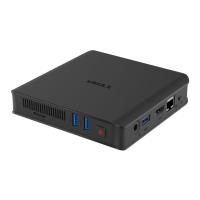

 To Next Page