
 Need help?
Do you have a question about the Unikito Program A and is the answer not in the manual?
This document describes the assembly and features of a Unikitó L-shaped desk, available in two configurations: Program A and Program B. The manual emphasizes ease of assembly with recommendations for two people and loose tightening of screws until all pieces are in place.
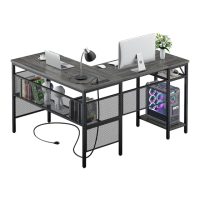
The Unikitó L-shaped desk is designed to provide a spacious and organized workspace. It features a large desktop surface, integrated shelving units, and a power outlet for convenient access to electricity. The desk is reversible, allowing users to choose the orientation of the shelving unit (left for Program A, right for Program B) to best suit their room layout and personal preferences. The design incorporates metal mesh panels, contributing to a modern aesthetic and potentially offering additional storage or display options.
The desk comprises several components, including:
The power outlet (Part 7) is a key feature, providing integrated electrical access directly on the desktop. The use of M6, M5, and M4 screws, along with wood dowels, indicates a robust assembly method. The inclusion of plastic feet (Part 9) suggests attention to floor protection and stability.
The desk is designed for versatile use in home offices, studies, or other workspaces. Its L-shape maximizes corner space, offering ample room for computers, monitors, documents, and other office essentials. The integrated shelving provides convenient storage for books, decorative items, or office supplies, helping to keep the desktop clear and organized. The reversible design (Program A vs. Program B) allows users to customize the desk's orientation to fit their specific room layout and workflow preferences. The power outlet is strategically placed for easy access to charge devices or power electronics.
While the manual does not explicitly detail maintenance features, the construction materials (likely metal frames and wooden/engineered wood desktops) suggest standard care. Regular dusting and wiping with a damp cloth would likely suffice for cleaning the surfaces. The metal components are probably powder-coated or painted, offering some resistance to scratches and corrosion. The M6 plastic feet (Part 9) are designed to protect floors and can be replaced if damaged, contributing to the longevity of the desk. The modular nature of the assembly, with individual parts and screws, implies that components could potentially be replaced if necessary, though this is not explicitly stated. The recommendation to tighten screws after all pieces are together also implies that periodic re-tightening might be beneficial to maintain stability over time. The company's commitment to providing "100% satisfactory solution" for damage or missing parts also suggests good post-purchase support, which indirectly contributes to the long-term usability and maintenance of the product.
 General
| Brand | Unikito |
|---|---|
| Model | Program A |
| Category | Indoor Furnishing |
| Language | English |

 To Next Page
