Service Manual
11
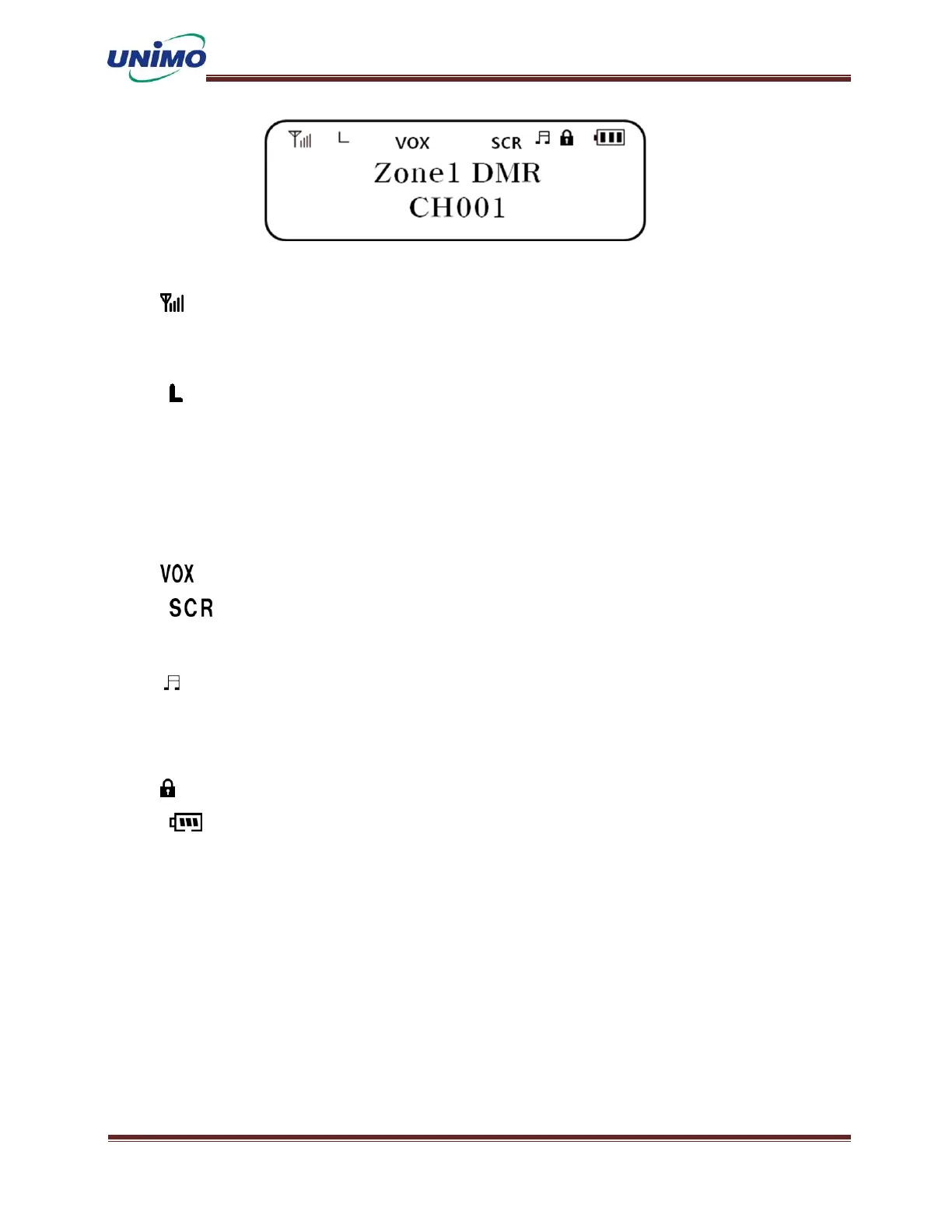
① Receiving signal strength display: Status display according to the
strength of the received signal. If the signal is strong, all 4 bars
light up.
② Transmission output: When the “L” icon is turned on, the channel’s
transmission output operates in [Low power mode]. When the “H” icon is
turned on, the channel’s transmission output operates in [High power
mode].
③ Txi: When the TX Interrupt function is activated, the icon turns on.
(Limited to supported models)
④ Mode:“VOX” Icon lights up when the terminal operates in VOX mode.
⑤ Secret Mode: When the channel is operated in secret mode, the
“SCR” Icon turns on. (Limited to supported models)
⑥ Tone mute: When the user can hear various tones from the terminal,
the icon is turned on and in silence, the terminal does not emit a tone
and the icon is turned off.
⑦ Lock: Icon lights up when the terminal is set to locked.
⑧ Battery remaining amount display: You can display the remaining
battery amount, and all icons turn on when the battery is fully charged.
As the remaining battery power decreases as you use the device, the icons
turn off one by one. When the battery-shaped outer icon blinks, it
indicates that the battery needs to be recharged.


 To Next Page
 Loading...