Service Manual
30
Message
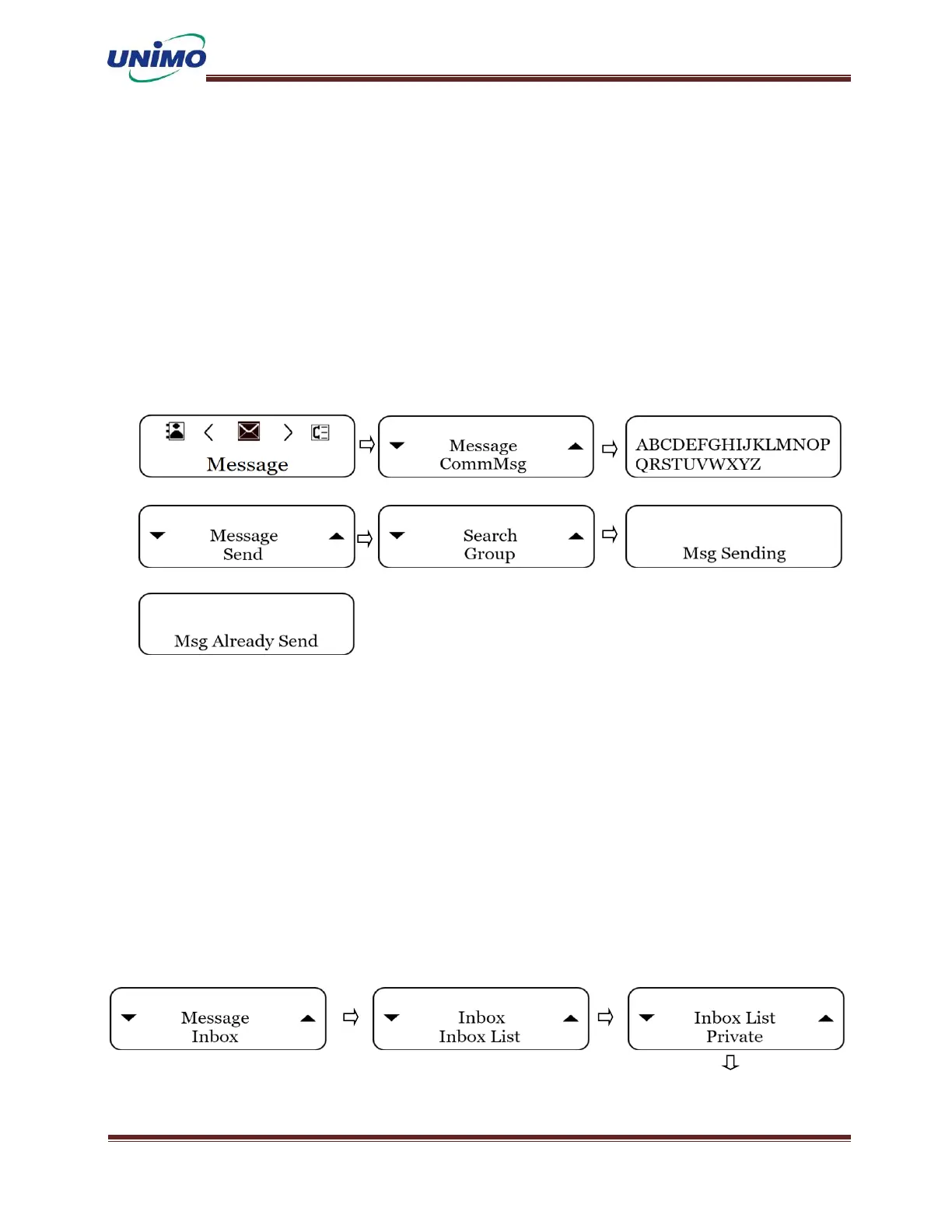
Send Message
◼ Press the ‘MENU’ button (LCD display: “Message ”)
◼ Press the ‘DOWN’ button (LCD display: “CommMsg”)
◼ Press the ‘MENU’ button again (LCD display: “Message Display”)
◼ Press the ‘MENU’ button (LCD display: “Send”)
◼ Press the ‘MENU’ button again (LCD display: “ID Display”)
◼ Press the ‘MENU’ button again to send.
Inbox Message
◼ Press ‘MENU’ button (LCD display: “Message ”)
◼ Press ‘MENU’ button to select the inbox. (LCD display: “Inbox”)
◼ Press ‘MENU’ button again (LCD display: “Inbox List”)
◼ Press ‘MENU’ button (LCD display: “ID Display”)
◼ Press ‘MENU’ button (LCD display: “Inbox Message”)
◼ Press ‘MENU’ button (LCD display: “Reply”)
◼ Press ‘MENU’ button again (LCD display: “Message Display”)
◼ Press ‘MENU’ button again to transmit.



 To Next Page