Service Manual
34
Zone
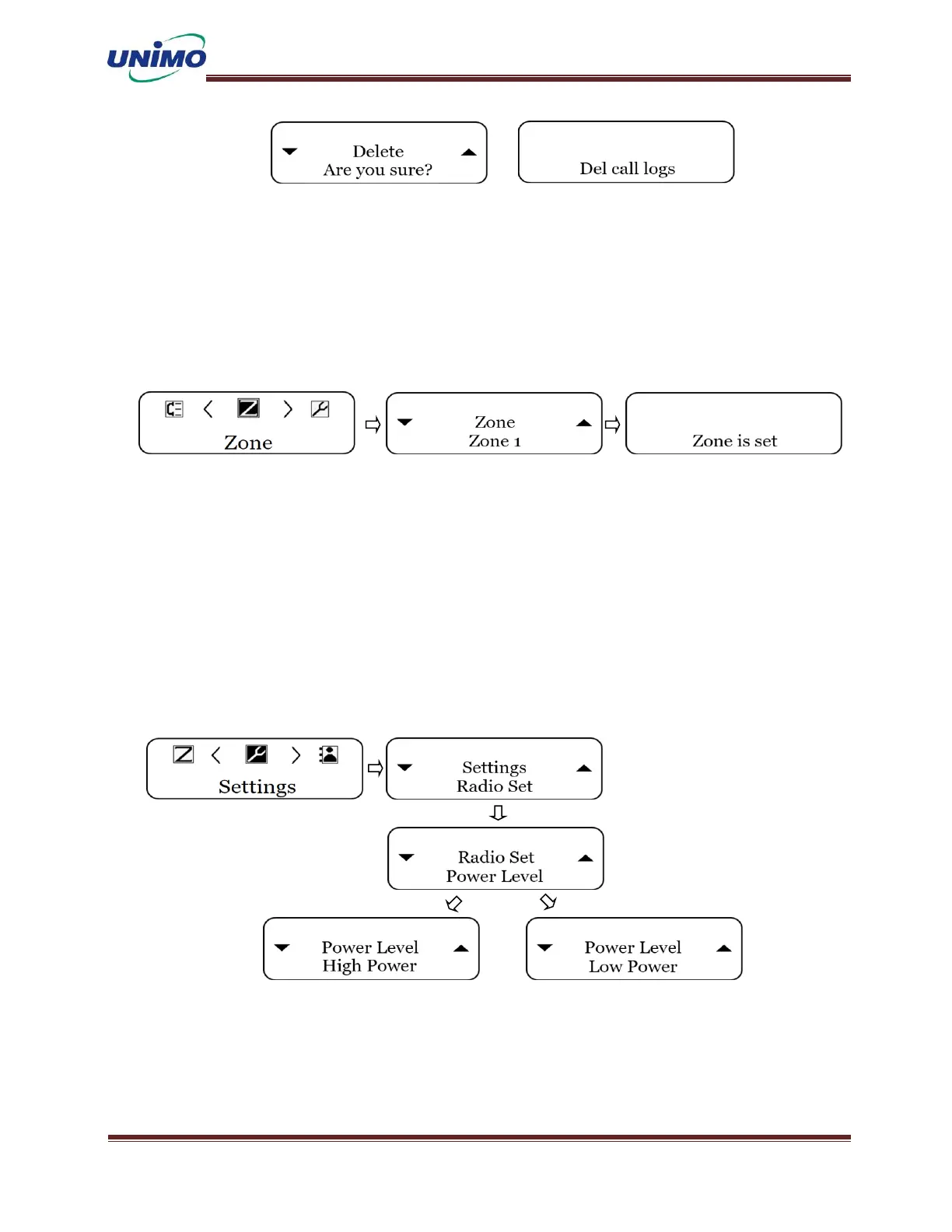
◼ Press ‘MENU’ button to select a zone. (LCD display: “Zone”)
◼ Press ‘MENU’ button again (LCD display: “Zone1”)
◼ Use ‘UP, DOWN’ buttons to select the desired zone, and use the ‘MENU’ button to
select. LCD display: “Zone is set”)
Radio Setting – Power Level
◼ The radio’s output can be changed to the user’s desired output.
◼ Press ‘MENU’ button to select the settings. (LCD display: “Radio Set”)
◼ Press ‘MENU’ button again (LCD display: “Power Level”)
◼ Press ‘MENU’ button again and select the output using the ‘UP, DONW’ keys.
(LCD display: “High Power”,”Low Power”)
◼ -Change radio output-
Radio Setting – Language
◼ Change radio’s language to your preferred language.
◼ Press ‘MENU’ button to select the setting. (LCD display: “Radio Set”)



 To Next Page