Service Manual
9
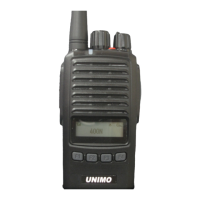
Power ON/OFF Volume Variable
If you slowly turn the volume switch clockwise, the device turns on and the volume graduall
y increases. If you turn it counterclockwise, the volume decreases and the power turns off.
Channel Change Switch(encoder)
Wireless channels must be programmed into the terminal in advance using a CPS program, and
a total of 1024 channels can be entered and selected. When the channel selection switch is
turned clockwise, the programmed channel changes one step at a time to the next channel (di
rection of increasing channel number), and when turned in the opposite direction, it change
s one step at a time to the previous channel (direction of decreasing channel number). This
channel change is possible at the same interval even by using the button set for channel c
hange..
PTT(Transmit) button
When you press the largest PTT button located on the side of the terminal, the terminal cha
nges to transmission mode and transmits a wireless signal using a pre-programmed channel an
d transmission output. When you release the PTT button, the terminal stops transmitting and
enters the receiving standby state..
Monitoring button(Analog-only function)
Use the monitor button to check the reception status of the set channel.
Continuous mode: If you press the monitor button within about 2 seconds, you can continuous
ly check the reception status of the channel with a noise and a “beep” tone. If you press
the monitor button again, the monitor function will be canceled and the terminal will be i
n a reception standby state..
Emergency button
If an emergency situation occurs according to a preset function, if you press the red emerg
ency button on the top of the main unit, the terminal emits an emergency siren sound throug
h its own speaker. At the same time, an emergency signal is transmitted through the emergen
cy channel.


 To Next Page
 Loading...