Need help?
Do you have a question about the Unitech HT320 and is the answer not in the manual?
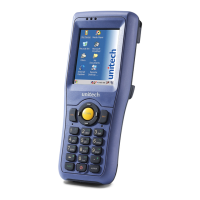
The Unitech EA320 is a robust industrial PDA designed for efficient data collection and mobile computing in various professional environments. This device is built to withstand demanding conditions, making it suitable for applications in retail, logistics, field service, and more.
The EA320 serves as a versatile mobile computer, integrating multiple functionalities to streamline operations. At its core, it features an intuitive touch screen interface, allowing for easy navigation and interaction with applications. The device is equipped with a powerful scan engine, enabling rapid and accurate barcode scanning, which is crucial for inventory management, asset tracking, and point-of-sale operations. Physical scanner trigger keys are strategically placed on the sides of the device, providing ergonomic access for continuous scanning tasks.
For communication and data transfer, the EA320 supports various connectivity options. It includes a USB Type C charging port, which also facilitates data synchronization. An earphone jack is available for audio output, useful for voice-guided applications or communication. The device also incorporates NFC (Near Field Communication) capabilities, allowing for quick and secure short-range data exchange, such as contactless payments or tag reading.
The EA320 is designed with user feedback in mind, featuring LED indicators that provide visual cues for device status, such as charging and scanning. A front camera is integrated, which can be used for image capture, video calls, or documentation purposes, while an autofocus camera ensures clear and detailed photos. For enhanced visibility in low-light conditions, a flash LED is included.
Input methods extend beyond the touch screen to include physical keypads, offering tactile feedback for data entry, which can be particularly useful in environments where gloves are worn or precise input is required. Function keys and volume keys provide quick access to common operations and audio adjustments.
The EA320 is engineered for ease of use and durability in professional settings. Its design incorporates a hand strap, allowing users to securely hold the device during prolonged use, reducing the risk of accidental drops. The device's robust construction is evident in its ability to accommodate a battery cover lock, ensuring the battery remains securely in place even during vigorous activity.
For memory expansion and communication, the EA320 features a TF card slot and two Nano SIM card slots, located within the battery compartment. This allows users to expand storage capacity and utilize cellular data for connectivity, making the device suitable for field operations where Wi-Fi may not be available. The process for installing and removing these cards is designed to be straightforward, requiring a gentle press to insert or release the cards.
Charging the device is flexible, with options for both USB Type C cable charging and cradle charging. The POGO pins on the device and the cradle facilitate convenient drop-in charging, eliminating the need to constantly plug and unplug cables. This is particularly beneficial in environments where devices are frequently docked and undocked throughout a shift. The charging status is clearly indicated by an LED, which turns red during charging and off when fully charged, providing a quick visual check for users.
The device's power button is easily accessible, allowing for simple power management. The inclusion of a speaker ensures that audio alerts, notifications, and voice prompts are clearly audible to the user.
Maintaining the Unitech EA320 is designed to be user-friendly, with several features aimed at ensuring its longevity and reliable performance. The battery cover is removable, allowing for easy battery replacement, which extends the operational life of the device and ensures continuous productivity. The battery cover lock mechanism, which switches between "unlock" and "lock" positions, secures the battery and protects internal components from dust and moisture.
The device's internal components, such as the TF card and SIM card slots, are protected by the battery cover, minimizing exposure to environmental elements. When installing or removing these cards, the process is designed to be gentle, preventing damage to the delicate slots.
For optimal performance and to prevent damage, users are advised to keep all connectors, including the USB Type C port and earphone jack, free from contaminants such such as dust, grease, mud, and water. This proactive maintenance helps prevent issues like communication failures, short circuits, and overheating. In the event of connector damage, it is crucial to ensure professional repair to avoid further complications.
The LED indicators not only provide operational status but also serve as a diagnostic tool, indicating charging status (red for charging, off for fully charged) and scanning status (red blink for good read, blue for customized settings). This visual feedback assists users in quickly identifying the device's state and troubleshooting minor issues.
The availability of product documentation, often accessible via QR codes, further supports maintenance by providing detailed instructions and information, empowering users to perform basic upkeep and understand advanced features. This comprehensive approach to design and support ensures the EA320 remains a reliable tool for demanding industrial applications.
 General
| WWAN | Optional |
|---|---|
| GPS | Optional |
| Sealing | IP54 |
| Touch Panel | Yes |
| Keypad | Numeric Keypad |
| Scanner | 1D Laser Scanner (Optional) |
| Wireless Communication | Wi-Fi, Bluetooth |
| NFC | Optional |
| Battery | Removable 3.7V 2200mAh Li-ion |
| Expansion Slot | MicroSD |
| Storage Temperature | -30°C to 70°C |
| Drop Specification | 1.2m |
| I/O Ports | USB |
| Operating Temperature | -20°C to 50°C |


 To Next Page