EasyManua.ls Logo

Unitech UT-1404 - User Manual

Unitech UT-1404
12 pages
Print Icon
To Next Page IconTo Next Page
Loading...
AL 1
COM
Model No. : UT-1404
z
OPERATION MANUAL
z
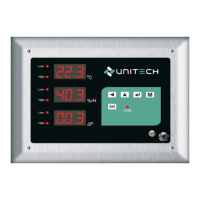
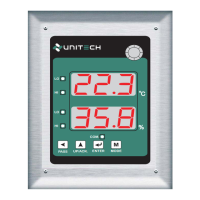
CLEAN ROOM INDICATOR TEMP+HUMIDITY (RH)
Model No. : UT-1404
PASS
MODE
ENTER
UP/ACK.
LO
LO
HI
HI
COM.
B
C
%
22.3
35.8
+91 94273 01436
Sales:
www.utplindia.in
Website:
Sure for service with hi-end versal nologyUni TechSure for service with hi-end versal nologyUni Tech
E-mail :
sales@utplindia.in
Add.-78/1/Z/3, Makarpura GIDC, Makarpura, Vadodara Ph : +91 7046223333

Questions and Answers

  • K
    Katelyn RobinsonAug 4, 2025
    What to do if all LEDs and display are not lighting on Unitech UT-1404?
    • M
      Melissa JohnsonAug 4, 2025
      If all LEDs and the display on your Unitech Touch Panel are not lighting up, it could be due to a lack of power to the controller. Inspect the power line connections. Another potential cause is a control circuit failure, in which case, you should check the control supply voltages.
  • E
    Eric FrancisAug 14, 2025
    Why is my Unitech UT-1404 keypad not working?
    • D
      Donald AdamsAug 14, 2025
      If the keypad on your Unitech Touch Panel is not functioning, there are a couple of potential reasons. The keypads may be locked, in which case you should check keypad continuity. Alternatively, the keypads could be defective, requiring replacement.
  • K
    kanerobertAug 23, 2025
    How to fix Unitech UT-1404 sensor break error?
    • C
      Christina CollinsAug 23, 2025
      If you're encountering a sensor break error on your Unitech Touch Panel, it might be due to the sensor not being connected properly. Ensure the sensor is connected correctly. If the sensor is connected, you may need to replace the sensor.

Summary

Introduction

Front Panel Description

Seven Segment LED Displays and Status Indicators

Describes the LED displays and their meaning for process values and communication status.

Internal Sensor Details

Details the internal Temperature and Humidity sensor if applicable.

Keypad Functions

Explains the functions of the device's keypad buttons for operation and programming.

Technical Specifications

Input and Power Supply

Details the types of inputs for temperature and humidity, and transmitter power supply.

Display and Indication

Describes the LED display for Temp & RH and status indication LEDs.

Measurement Range and Accuracy

Specifies the operational ranges for Temperature and Humidity and their respective accuracy levels.

Communication and Parameters

Outlines communication protocols like Modbus RTU and programmable parameters.

Installation

Terminal Connections and Wiring

Provides details on connecting the 24VDC power supply and RS-485 communication terminals.

Programming Flow Chart

Configuration Mode

Password for Parameter Setting

Sets or changes the password for accessing and modifying parameters.

Alarm 1 and 2 Indication;Action (Temp)

Configures the indication and action for Alarm 1 and Alarm 2 for temperature readings.

Alarm 1 and 2 Action (RH)

Configures the action for Alarms 1 and 2 based on Humidity readings.

Node Address, Baud Rate, and Parity

Sets the device's node address, communication baud rate, and parity settings.

Setup Mode

Password for Setup Parameter

Sets the password for accessing the setup mode parameters.

Temperature Setpoints and Hysteresis

Configures alarm setpoints and hysteresis values for temperature.

Humidity Setpoints and Hysteresis

Configures alarm setpoints and hysteresis values for humidity.

System Parameters

Temperature System Values

Sets zero value, span value, offset, and system parameter for temperature.

Humidity System Values

Sets zero value, span value, offset, and system gain for humidity.

Change Password Mode

Old and New Password Settings

Allows changing the existing password to a new desired password.

Error Message and Troubleshooting

Register Address for Modbus RTU Protocol

Default Communication Details

Unitech UT-1404 Specifications

General IconGeneral
Operating Temperature0°C to 50°C
Storage Temperature-20°C to 60°C
Input Voltage12V DC
Display Size14 inches
Brightness250 cd/m²
InterfaceUSB, HDMI
Touch TechnologyProjected Capacitive Touch

Related product manuals