Need help?
Do you have a question about the UNITED UN40321S and is the answer not in the manual?
Crucial safety guidelines for operation, installation, and handling the TV safely.
Warnings on battery ingestion, heat exposure, and proper disposal.
Explains symbols for Class II Equipment, Live Terminals, and Laser Product.
Detailed warnings on battery ingestion and instructions for wall mounting.
Tips for reducing energy consumption and environmental impact.
Lists general features like remote control, digital tuning, HDMI, USB, and OSD menu.
Explains HDR and HLG for enhanced picture quality.
How to use the TV as a digital picture frame in standby mode.
Instructions for turning the TV on/off and using standby/reset functions.
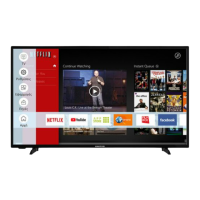
How to navigate and operate the main TV menu using the remote.
Detailed instructions on using the single physical control button on the TV.
Customizing the Home menu by adding, deleting, or repositioning items.
Using search functions and accessing the electronic programme guide.
Setting timers, managing recordings, and handling applications.
Adjusting accessibility options and managing privacy settings.
Managing input sources and configuring their settings.
Instructions for inserting batteries into the remote control.
Connecting the TV to power and antenna sources.
Information on trademarks and guidelines for product disposal.
Details on TV broadcasting standards and receiving channels.
Specs for reception, power consumption, standby mode, and physical dimensions.
Specifications for wireless LAN frequency ranges and output power.
Restrictions for using wireless LAN in different countries.
Detailed explanation of each button on the remote control and its function.
Using the standby button and customizing the 'My Button 1'.
Illustrates various connectors like VGA, HDMI, USB, and LAN.
USB port current limits and recommendations for HDMI cables.
Step-by-step instructions for turning the TV on and off.
Initial setup including language, country, privacy, and network settings.
Selecting and prioritizing broadcast types for channel searching.
Procedures for scanning digital cable, satellite, and analogue channels.
Connecting and playing media files from USB storage devices.
Steps and requirements for recording programs using a USB drive.
Information on recording duration, partitioning, and potential issues.
Using timeshift and instant recording features.
Configuring recording preferences and formatting USB disks.
Using the media browser, setting preferences, and loop/shuffle modes.
Personalizing boot logo and streaming content to mobile devices.
Controlling CEC-enabled devices connected via HDMI.
Using ARC and controlling audio systems via TV remote.
How to access and use the TV's electronic manual for instructions.
Configuring CEC, Audio Link, and connecting input devices.
Adjusting picture modes, energy saving, and backlight settings.
Adjusting image size, zoom, and picture position.
Fine-tuning image position and clarity for PC input.
Correcting interference and improving picture clarity for PC input.
Configuring Dolby Audio and Surround Sound settings.
Connecting sound devices and selecting sound output preferences.
Using AVL and adjusting equalizer, bass, and digital output.
Selecting network type, scanning, and connecting to networks.
Testing internet speed and configuring network advanced settings.
Enabling/disabling Networked Standby Mode for remote network wake-up.
Performing automatic and manual channel scans for various broadcast types.
Adjusting analogue channels and configuring satellite antenna settings.
Clearing service lists and monitoring signal information.
Displays features like High Contrast, Hard of Hearing, and Audio Description.
Settings for dialogue clarity and spoken subtitle preferences.
Features for screen magnification and minimap control.
Managing privacy privileges for smart TV applications and cookies.
Setting up parental locks, menu locks, and child locks.
Defining new PINs and managing default CICAM PINs.
Configuring date/time, managing sources, and Netflix settings.
Samba Interactive TV settings and general device configurations.
Setting up Alexa and Google Assistant for voice control.
Adjusting menu timeout duration and standby LED behavior.
Checking for software updates and viewing the application version.
Configuring auto power down and subtitle display modes.
Editing, filtering, and managing the channel list and favourite lists.
Setting up parental locks, menu locks, and child locks.
Browsing schedules, using timeline and now/next layouts, and filtering events.
Searching the guide, viewing event details, and setting/deleting timers.
Recording broadcasts and managing record timers.
Accessing and using teletext services, including mix mode.
How to search for and install software upgrades via broadcast or internet.
Solutions for common problems like TV not turning on, poor picture, and no picture.
Tips for resolving no sound and remote control issues.
Troubleshooting no signal and centering VGA images.
Reasons for recording unavailability and slow USB disk speed.
Table showing compatibility of AV and HDMI signals.
List of supported video file extensions, codecs, and resolution/bitrate.
List of supported picture file extensions and specifications.
List of supported audio file extensions and formats.
Lists supported external and internal subtitle file formats.
Steps for connecting the TV to a wired network via Ethernet.
Steps for connecting the TV to a wireless network, including hidden SSID.
Enabling/disabling Networked Standby Mode for remote network wake-up.
Using the TV as a wireless display device for streaming.
Pairing and connecting other wireless devices like audio and keyboards.
Transferring images and streaming audio from mobile devices.
Accessing, launching, and managing installed applications.
Navigating the web browser, managing bookmarks, and searching websites.
Explanation of HbbTV services and interactive applications.
Using the Smart Center app for streaming and remote control.
Navigating features in the Smart Center app like My Channels and EPG.
Setting up Alexa Built-in and configuring the Alexa Home Screen.
Step-by-step guide for setting up Alexa integration with the TV.
Common voice commands for controlling the TV with Alexa.
Guide for setting up Google Assistant for TV voice control.
Voice commands for controlling the TV with Google Assistant.
Explanation of the DART feature for automatic battery ordering.
Information on DVB receiver suitability and potential future changes.
Table detailing VESA hole patterns, screw sizes, and thread types.
VESA mounting specifications presented in various languages.
Statement of compliance with EU directives for radio equipment.
EU declarations of conformity provided in multiple languages.
 General
| Screen Size | 40 inches |
|---|---|
| Smart TV | Yes |
| HDMI Ports | 3 |
| USB Ports | 2 |
| Display Technology | LED |
| Operating System | Android |
| Wi-Fi | Yes |
| Bluetooth | Yes |
| Sound Output | 20W |
| Resolution | Full HD (1920 x 1080) |

 To Next Page