EasyManua.ls Logo

Unitron uDirect - User Manual

Unitron uDirect
2 pages
Print Icon
To Next Page IconTo Next Page
Loading...
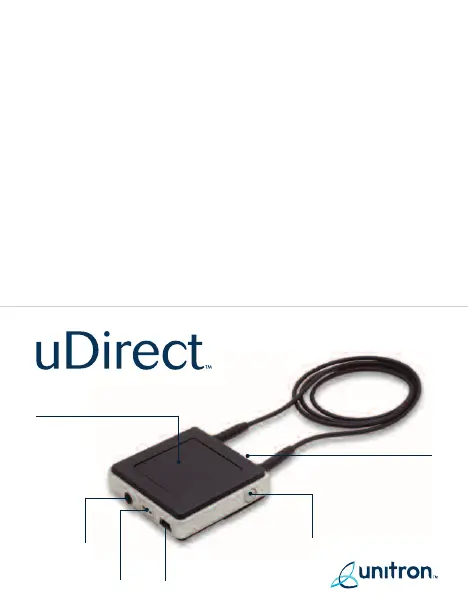
Access button
Indicator lights
Audio
input
FM input Charging input
On/Off
button
Access button
Accept Call -
Press once
Disconnect Call -
Press once
Reject Call -
Press and hold for
2 seconds
On/Off button
On - Push On/Off
button for
2 seconds
Off - Push On/Off
button for
2 seconds or
longer
09-016 029-5728-02

Other manuals for Unitron uDirect

Questions and Answers

  • A
    Anna BurtonJul 26, 2025
    How to adjust the volume on Unitron Hearing Aid during phone calls?
    • J
      Jason DaltonJul 26, 2025
      If the volume of phone conversations through your Unitron Hearing Aid is uncomfortable, either too low or too high, it may be because different audio sources have different output volumes. To resolve this, adjust the volume on the connected audio source or mobile phone, or change the volume on the hearing instruments themselves to achieve a comfortable listening level.
  • N
    Nicholas BrowningJul 31, 2025
    What to do if people can't hear me well when using Unitron Hearing Aid for calls?
    • D
      Diamond PughJul 31, 2025
      If people have trouble hearing you when you make phone calls using your Unitron Hearing Aid with uDirect, it could be that the uDirect’s microphone openings are covered or not picking up your voice correctly. Make sure the microphone openings are not covered, and speak directly into the uDirect. Avoid turning the uDirect sideways while speaking, and ensure it doesn't rub against your clothing.
  • C
    Christopher BeanAug 4, 2025
    What to do if Unitron Hearing Aid doesn't ring even when Bluetooth is flashing?
    • G
      gcortezAug 4, 2025
      If your mobile phone is ringing and the Bluetooth indicator is flashing, but you're not getting any ringing indication in your Unitron Hearing Aid, the uDirect might be out of range of the hearing instruments. Make sure the uDirect is within 45 cm (18 inches) of the hearing instruments, and wear it around your neck to maintain proximity.
  • O
    Olivia Baker MDAug 8, 2025
    How to reset unresponsive Unitron uDirect device?
    • A
      angelamyersAug 8, 2025
      If your Unitron uDirect is unresponsive and all three indicators are lit solid, this may indicate a software problem. Unplug any connectors from uDirect, including the USB charging connector, and press the reset button. If the problem persists, delete Bluetooth pairings and press the reset button again. If the problem still persists, please contact your hearing healthcare professional.
  • D
    Dr. Elizabeth PerezAug 12, 2025
    Why is my Unitron Hearing Aid not indicating a call when my phone rings?
    • J
      Jennifer WrightAug 13, 2025
      If your mobile phone is ringing but the Bluetooth indicator isn't flashing and there's no ringing sound in your Unitron Hearing Aid, the cause may be that Bluetooth is off on your mobile phone. Ensure Bluetooth is turned on in your mobile phone. Another reason might be that the uDirect and your mobile phone are not connected. To solve this, try these steps: 1. Disable and then re-enable Bluetooth on your mobile phone. 2. Turn your uDirect off and then on again to reactivate its Bluetooth functionality. 3. Activate uDirect by selecting it in your mobile phone’s “Active device” menu. 4. Reduce the distance between uDirect and your mobile phone.
  • E
    Eric SandersAug 17, 2025
    How to stop hearing key-press tones in my Unitron Hearing Aid?
    • K
      Kevin JonesAug 17, 2025
      If you're hearing your mobile phone’s key-press tones in your Unitron Hearing Aid, it's likely that the key-press tones are enabled on your mobile phone. Deactivate key-press and confirmation tones on your mobile phone.
  • B
    brandi50Aug 21, 2025
    How to repair Unitron uDirect with my mobile phone?
    • M
      Michael FrancisAug 21, 2025
      If your Unitron uDirect is no longer recognized by your mobile phone or another Bluetooth device it was previously paired with, repeat the pairing process between the uDirect and the Bluetooth device.

Summary

uDirect Device Operation

Access Button Control

Instructions for accepting, disconnecting, and rejecting calls using the Access button.

Power and On;Off Button

How to power the device on and off using the On/Off button with specific press durations.

Indicator Lights Guide

Battery Status Indicator

Defines light patterns for battery charge levels: full, low, empty, charging, and fully charged.

Audio Streaming Indicator

Explains the meaning of orange indicator lights for active and paused audio streaming.

Bluetooth Connection Indicator

Details blue light signals indicating Bluetooth readiness, incoming calls, and active connections.

Unitron uDirect Specifications

General IconGeneral
BrandUnitron
ModeluDirect
CategoryAccessories
LanguageEnglish

Related product manuals