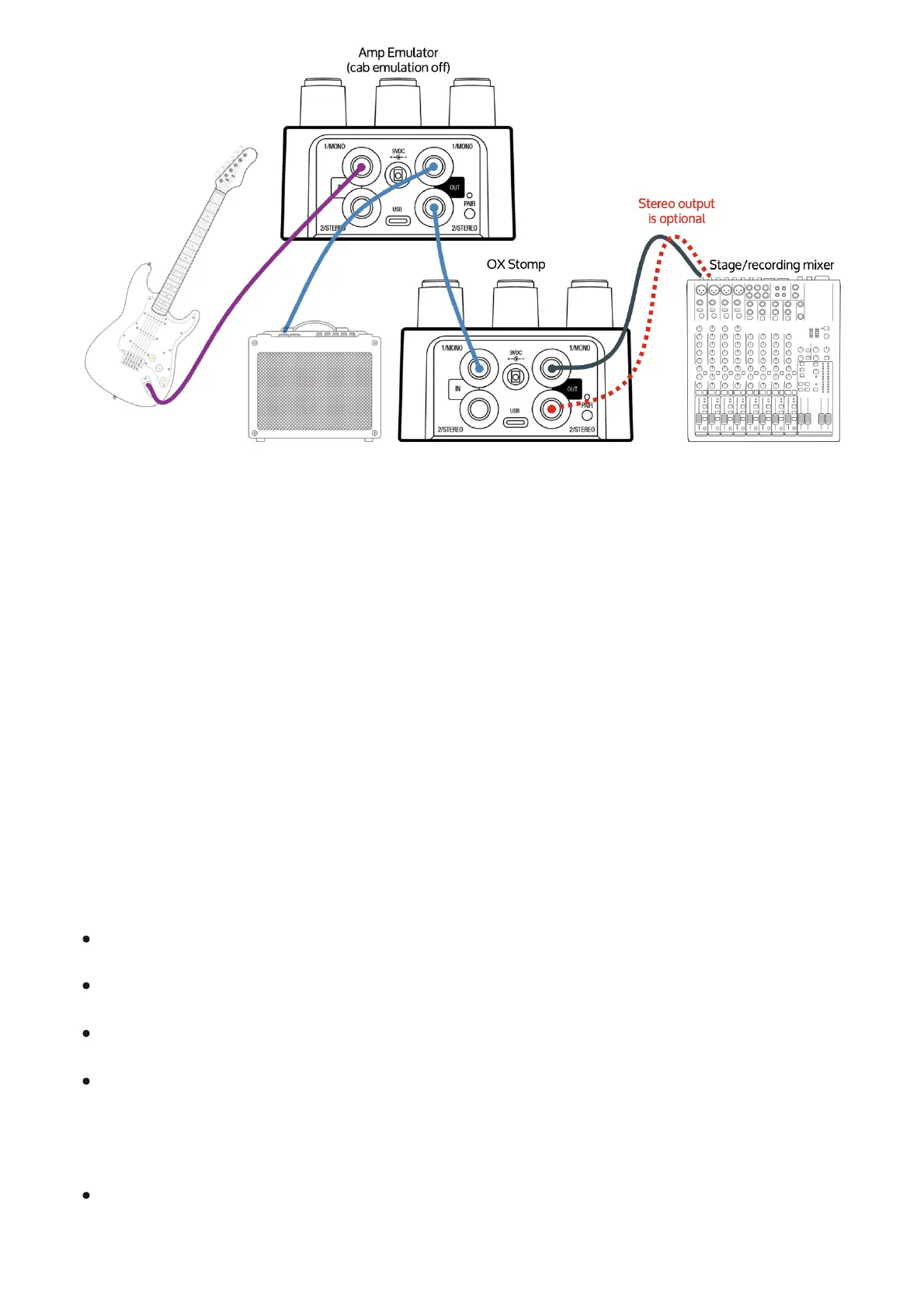
Amp emulator and OX Stomp with effects, split to
PA front of house (FOH) and guitar amp
You can split OX Stomp's outputs between a guitar amp and OX Stomp. With this setup you can
have your amp sound on stage with the OX Stomp effects, and a PA's front of house signal with
the OX Stomp effects and its mic'd cab sound.
The advantage of this connection setup is that you can use the OX Stomp effects with your
guitar amp. The disadvantage is that you'll need to edit and save OX Stomp sounds in UAFX
Control with a Direct Box hard-panned to one side (for your guitar amp input) and with a mic
hard-panned to the other side (for your mixer/FOH input).
Connect your instrument to your amp emulator input.
Turn off cab emulation on your amp emulator.
Connect one or both outputs from your amp emulator to OX Stomp.
Connect output 1 from OX Stomp to your guitar amp.
Important: In the Rig, configure one of the mics to use the Direct Box (instead of a mic)
hard-panned to the left.
Connect output 2 from OX Stomp to the mixer.
Important: In the Rig, configure the other mic (instead of the Direct Box) hard-panned to the



 To Next Page