Tip - You must program all your activity and power macros to be Variable macros
Now, you must program all macros that the client might use to turn on the system with a variable
change that changes the variable ProjectorPower to “1”. Thus no matter what button you use to turn on
the system, the MX-950 will know the true status of the projector is on. Likewise all macros that turn
the system off must change the variable ProjectorPower to “0”.
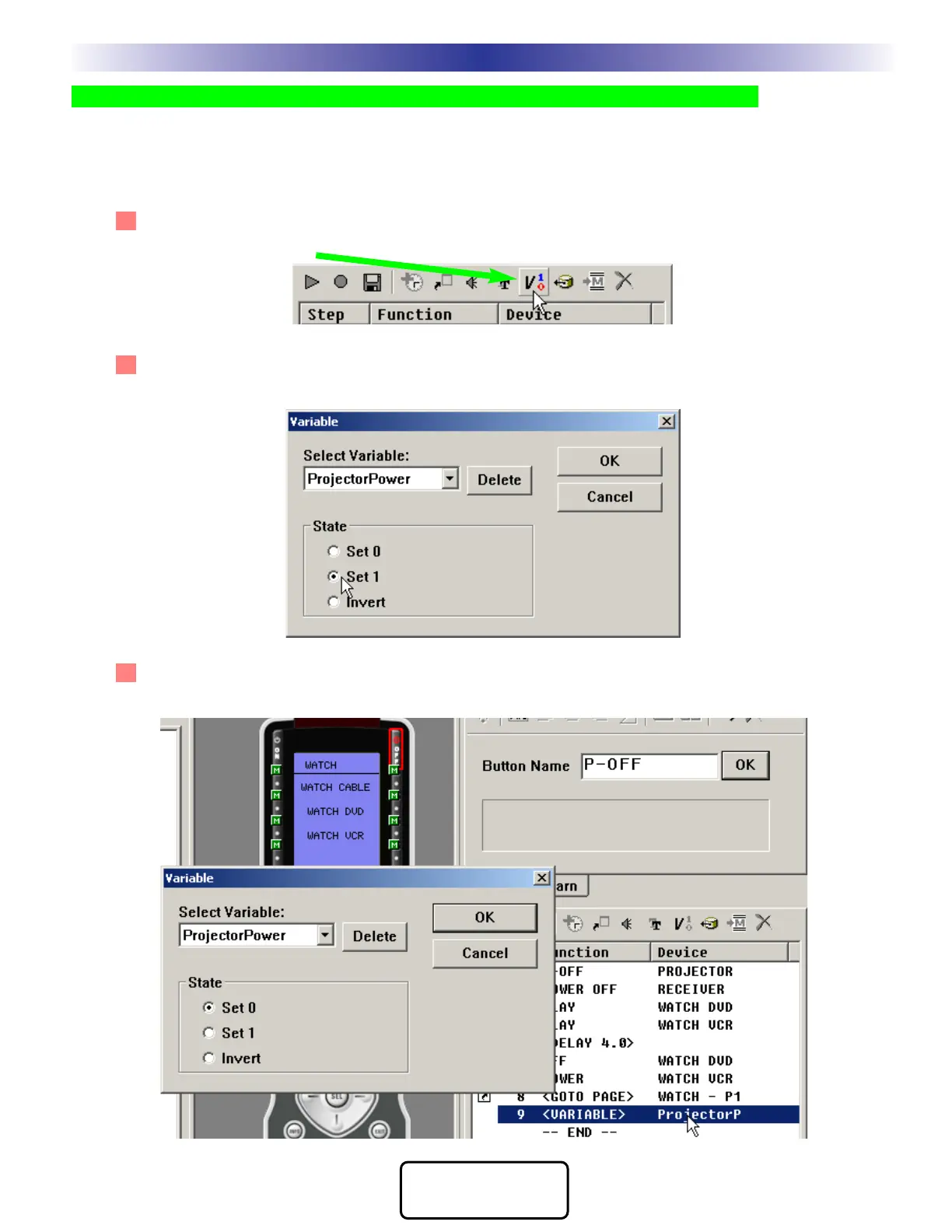
7 In all macros that power on the projector, repeat steps 1-7, then add a new step to all the macros.
Click on the Set Variable button on the macro toolbar.
8 The Set Variable window opens. Select the ProjectorPower variable and set it to a state of 1 (indicat-
ing that the projector is now powered on). Afterwards, the new step appears in the macro list.
9 In all macros that power OFF the projector add a new step to the macros. Click on the Set Variable
button and set the Projector Power variable to equal “0” after the projector is off.
33
Macro Programming
M
X
9
5
0
T
X
1
0
0
0
M
X
9
0
0
L
C
D
R
E
M
O
T
E
S
COMPLETE
CONTROL
™






 To Next Page