Pirate’s Hook 4p Manual
11
6. GAME OPTIONS
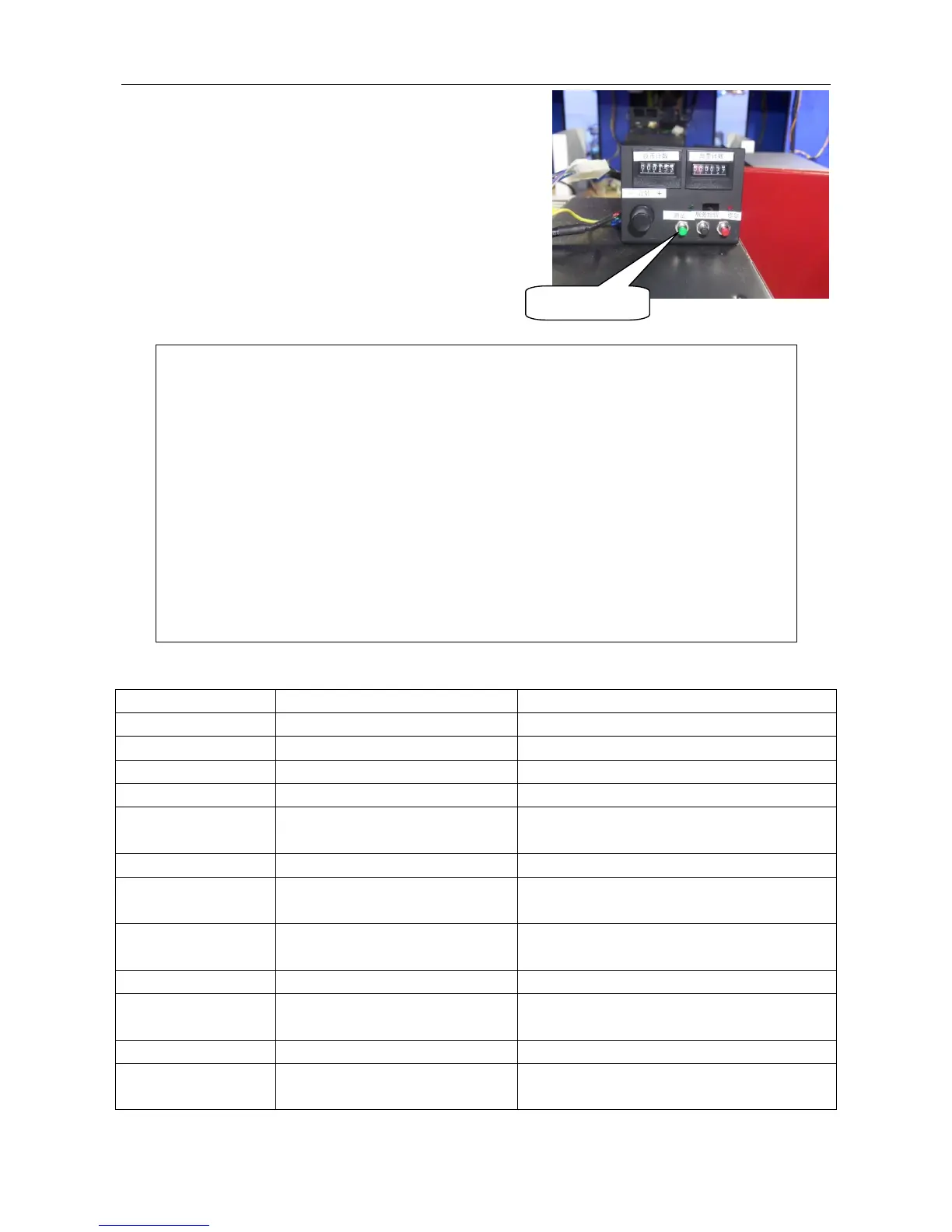
6.1 Testing Button Distribution:
You can see the testing button after you open the coin
door below orange fishing mechanism. Press test
button and enter Menu adjustment options.
6.2 Main Menu Options:
Main Menu
Game Mode
Input Test
Output Test
Game Reset
Language
Date/Time Setting
Host configuration
Bookkeeping
Daily Record
Exit& Without Save
Exit& Save
6.2.1 Game mode
Name Option Description
Free Play ON/OFF Turn on/off the free play mode.
Ticket Out ON/OFF Turn on/off payout tickets.
Coins per Round 1-10 Coin needed to insert for one game.
Demo Music ON/OFF Turn on/off the demo music.
Save Coins ON/OFF
Whether memorize inserted coins after
power off.
Volume 0-10 0 is mute, 10 is max.
Fixed Ticket 0-100
Fixed ticket setting. “0” is fixed ticket
off.
Lobster king
appears every
1-15(seconds) The frequency lobster appears
Ticket/Point Ticket/Point Award is given as ticket or points.
Average Ticket Out
8-100
Ticket payout setting. It is invalid when
fixed ticket ON or point mode ON.
Target Tickets Please refer to 6.2.1.1
Target Point
Setting
Please refer to 6.2.1.2











 To Next Page