Need help?
Do you have a question about the unotec CAUTIUM III and is the answer not in the manual?
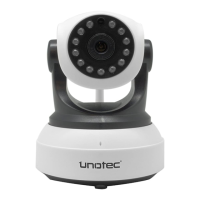
Connect camera to power/router and identify hardware components.
Illustrates the physical connection of the camera to the router.
Guide to downloading and installing the IPCAMERAHBP app for Android devices.
Connect the camera to a wireless network using router selection and password entry.
Details on configuring camera interface and various functions.
Instructions for installing the IPCameraHBP app on iPhone and iPad.
Search for nearby Wi-Fi networks and enter the password for connection.
Steps to view the camera feed and settings using the Internet Explorer browser.
Configure camera WiFi settings and other parameters through the web browser.
Install and use the P2PCLIENT.EXE software for remote monitoring on a PC.
 General
| Two-way Audio | Yes |
|---|---|
| Motion Detection | Yes |
| Pan and Tilt | Yes |
| Audio | Built-in microphone and speaker |
| Type | IP Camera |
| Resolution | 1920x1080 (Full HD) |
| Night Vision | Yes |
| Storage | MicroSD card (up to 128GB) |

 To Next Page