EasyManua.ls Logo

Uplink DigiCell AnyNET - User Manual

Uplink DigiCell AnyNET
16 pages
Print Icon
To Next Page IconTo Next Page
Loading...
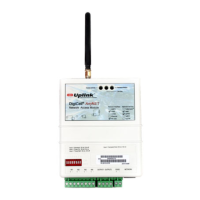
DIGICELL
®
ANYNET
NETWORK ACCESS MODULE
Product ID # 19-25133-040/-041
INSTALLATION AND
U
SERS GUIDE
Network Status
Service
Comm Activity
Input 1 Standard S3 off, S4 off
Input 1 Pulse Ctr S3 off, S4 on
Input 1 Timed Bell S3 on, S4 off
Input 1 Sampled Siren S3 on, S4 on
Network Interface
Network Service
Cellemetry
®
GPRS
SMS
1xRTT
TCP/IP
RS-232
Ethernet
CDMA
GSM
AMPS
Network Access Module
DigiCell
®
Any NET
S/N 9200920999
19-25133-070
307V100B
+ - + - + - + -
OUTPUT 1 OUTPUT 2
+ -
Question and Answer IconNeed help?

Do you have a question about the Uplink DigiCell AnyNET and is the answer not in the manual?

Summary

Warranty Information and Liability Waiver

Technical Support

Product Description

Installation Steps

Unit Wiring

Input 1 Wiring Configuration

Configuring Input 1 using DIP switches for Standard, Timed Bell, Sampled Siren, or Pulse Counter modes.

Inputs 2, 3, and 4 Wiring

Wiring details for inputs 2, 3, and 4, and Input 1 if set for standard input type.

Power Supply Connection

Connecting the customer-supplied 12 VDC, 2 A rated power supply to the unit's terminal block.

Serial Interface Details

Information on the RS-232 serial port for network retransmission of data packets.

Optional DB25 Connector

Antenna Specification

Regulatory Compliance

FCC RF Exposure Information

Details on human exposure to radio frequency electromagnetic energy and FCC guidelines.

Uplink DigiCell AnyNET Specifications

General IconGeneral
ManufacturerUplink
Data RateUp to 153 kbps
Operating Voltage3.3 - 5 V
InterfacesUART
InterfaceUART