EasyManua.ls Logo

Uplus Lighting IP1000 Strobe - Dimension; Trouble Shooting; Unit Does Not Work; Not Responding to DMX

Uplus Lighting IP1000 Strobe
13 pages
Print Icon
To Next Page IconTo Next Page
To Previous Page IconTo Previous Page
Loading...
12
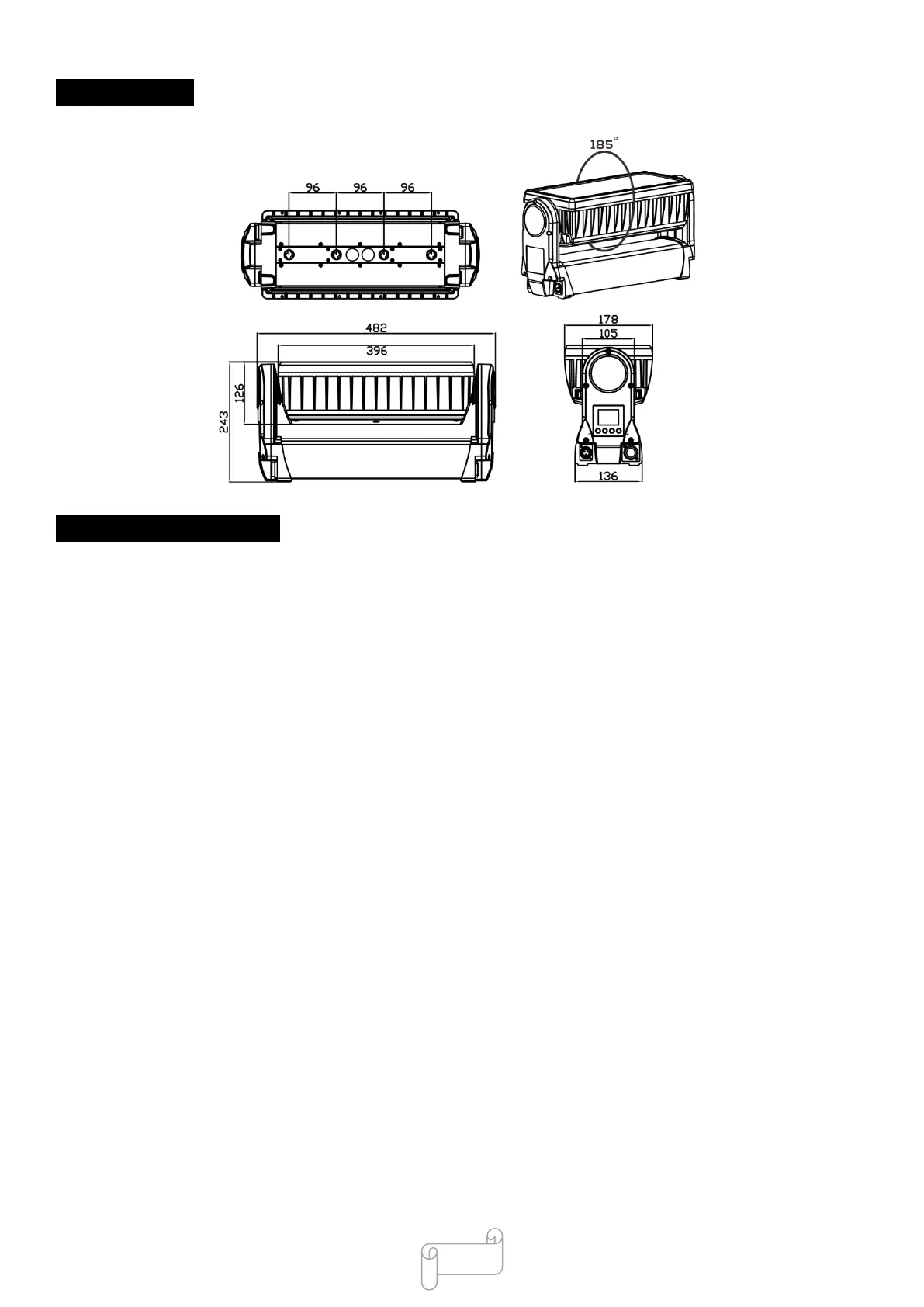
5.Dimension
6.Trouble Shooting
F
ollo
w
ing
a
r
e
a
few
c
o
mm
on
p
r
oble
m
s
th
a
t
m
a
y
occu
r
d
uring
ope
r
a
tion
.
He
r
e
a
r
e
s
o
m
e
s
ug
g
es
tion
s
fo
r
ea
s
y
tr
ou
b
leshooting
:
A.
The
un
it
does
no
t
work
,
no
li
ght
a
n
d
t
he
f
a
n
d
o
es
no
t
w
o
r
k
1.
Check
th
e
c
on
nect
ion of p
owe
r
a
nd
m
a
in
fu
s
e
.
2.
M
eas
ure
th
e
m
a
ins
volt
a
ge
on
th
e
m
a
i
n
co
nn
e
ct
o
r
.
3.
Check
th
e
pow
er
on
LED
.
B.
N
o
t
responding
t
o
D
MX
c
on
t
ro
ll
er
1.
D
M
X
LED
s
h
ou
ld
b
e
on.
If
no
t,
che
ck
D
M
X
co
n
nectors,
ca
b
l
es
to
s
ee
if
link
p
r
ope
r
ly
.
2.
If
th
e
D
M
X
LE
D
i
s
on
a
nd
no
r
espons
e
t
o
th
e
c
h
a
nn
el,
che
ck
th
e
a
dd
r
ess
s
etti
ng
s
a
nd
D
M
X
p
ol
a
r
ity
.
3.
If
y
ou
h
a
ve
i
nter
m
ittent
D
M
X
s
ig
n
a
l
p
r
oble
m
s
,
che
ck
th
e
p
ins
on
c
onn
ecto
r
s
or
on
PCB
of
th
e
u
nit
or
the
p
r
ev
iou
s
on
e.
4.
Tr
y
to
us
e
a
no
th
er
D
M
X
co
ntroller
.
5.
Check
if
th
e
D
M
X
ca
b
le
s
r
un
ne
a
r
or run
a
lon
g
s
id
e
t
o
h
ig
h
volta
ge
c
a
b
les
th
a
t
m
a
y
c
a
us
e
d
a
m
a
ge
or
in
terfer
ence
to
D
M
X
inter
face
circui
t.
C
.
One
of
the
cha
nn
el
s
is
no
t
w
o
r
k
ing
w
el
l
1.
Th
e
s
tep
p
er
moto
r
m
ig
h
t
b
e
dam
a
g
ed
or
the
c
a
b
le
c
on
nect
ed
to
th
e
PCB
is
b
r
oken.
2.
Th
e
m
oto
r
s
d
r
ive
IC
on
th
e
PCB
m
ig
h
t
b
e
o
ut
of
co
ndition