EasyManua.ls Logo

Uponor A3800167 - User Manual

Uponor A3800167
52 pages
Print Icon
To Next Page IconTo Next Page
Loading...
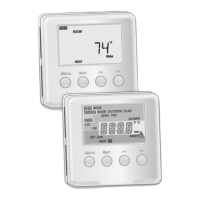
Climate Control Zoning System II installation and operation manual
Climate Control Zoning System II
installation and operation manual

Table of Contents

Other manuals for Uponor A3800167

Questions and Answers

  • S
    Sara LeeAug 8, 2025
    Why is my Uponor A3800167 Thermostat room too cold?
    • O
      obarrettAug 9, 2025
      If your Uponor Thermostat is making the room too cold, it could be due to several reasons. The thermostat setting might be too low, so try increasing the temperature setpoint. The thermostat's location could be influenced by an external heat source; consider moving it. Individual room thermostats may be incorrectly registered; ensure the thermostat is in the correct room or change the thermostat registration in the controller. There may be an incorrect minimum/maximum limitation; change the minimum/maximum limitation in the interface. In addition, an actuator may not open; in that case, replace the actuator. Contact the installer.
  • C
    Cynthia TaylorAug 14, 2025
    How to fix fluctuating floor temperature with my Uponor A3800167 Thermostat?
    • K
      Kara GrahamAug 14, 2025
      Fluctuating floor temperatures with your Uponor Thermostat can stem from several causes. The supply water temperature might be too high, so check the boiler or pump. If the heating fall back function is activated due to lost communication with the thermostat, check the connection and batteries of the room thermostat. The thermostat's placement might be in direct sunlight or near other heat sources; verify its location according to installation instructions and relocate if necessary. Also, ensure the thermostat is placed in the correct room; if not, change rooms as needed.
  • P
    patricia41Aug 21, 2025
    What to do if my Uponor Thermostat system does not start?
    • C
      cynthia41Aug 21, 2025
      If your Uponor Thermostat system fails to start, it could be due to a few reasons. First, check that the controller is connected to AC power and inspect the wiring in the 24 VAC compartment, ensuring there is 115 VAC power to the transformer. Also, a blown controller fuse or faulty wiring could be the culprit, so replace the fuse and/or correct any wiring issues.
  • L
    Latoya AliAug 27, 2025
    What to do if my Uponor Thermostat makes the room too warm?
    • J
      jonathonpowellAug 27, 2025
      If your Uponor Thermostat is causing the room to be too warm (or too cold in cooling mode), it may be because an actuator is not closing. Check that the actuator is correctly installed. If not, replace the actuator. Contact the installer.
  • K
    Kenneth SmithSep 2, 2025
    How to improve radio reception for my Uponor A3800167?
    • J
      Jessica RobertsSep 2, 2025
      Poor radio reception with your Uponor Thermostat could be due to the antenna being installed inside a metal cabinet or too close to other shielding objects, or the building structure might be unfavorable for radio transmission. Try changing the antenna location. If the problem persists, contact the installer.

Summary

Chapter 1: System Overview

Base Unit Features and Options

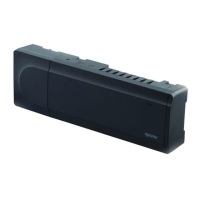
Base Unit Main Characteristics

Highlights key features like autobalancing, actuator control, and communication capabilities.

Thermostats: Dial and Digital Types

Chapter 2: Installation Setup

Chapter 3: Installing the Base Unit

Base Unit Placement and Modularity

Details placement strategies and modular design for the base unit.

Installing the Antenna

Base Unit Wall Mounting and Expansion

Connecting Actuators and Circulation Pump

Connecting Actuators to Base Unit

Guides the wiring of actuators to the base unit quick connectors for control.

Connecting Circulation Pump Relay

Explains how to wire a circulation pump via the base unit's relay.

Boiler Connection and AC Power Supply

Connecting a Boiler (Optional)

Details how to connect a boiler for heat source control using the base unit.

Connecting Base Unit to AC Power

Provides steps for connecting the base unit to its AC power source.

Testing Actuators

Actuator Test Cycle Procedure

Describes the process for manually testing actuator operation and cycle modes.

Chapter 4: Installing Thermostats and Sensors

Thermostat Placement and Labeling

Offers recommendations for optimal thermostat placement and labeling for identification.

Digital Thermostat Mounting and Attachment

Digital Thermostat Setup and Temperature Adjustment

Registering Thermostats with Base Unit

Registering Dial and Digital Thermostats

Details the step-by-step process for registering both dial and digital thermostats with the base unit.

Finishing the Installation

Final Checks and System Handover

Covers final system checks, thermostat attachment, report completion, and user handover.

Chapter 5: Operating the Base Unit

System Operation and Run Mode

Explains how the system operates and what normal run mode entails.

Managing Thermostat Registration on Base Unit

Chapter 6: Operating Dial Thermostats

Dial Thermostat Factory Reset

Factory Reset Procedure for Dial Thermostats

Provides instructions for resetting a dial thermostat to its default factory settings.

Chapter 7: Operating Digital Thermostats

Digital Thermostat Operation and Settings

Adjusting Temperature and Accessing Settings

Guides on temperature adjustment and navigating the thermostat's settings menu.

Digital Thermostat Sensor and Floor Temperature Limits

Digital Thermostat Advanced Settings and Resets

Room Calibration, Battery Replacement, and Factory Reset

Guides on calibration, battery replacement, and factory resetting digital thermostats.

Chapter 8: Maintenance

Restore from Backup Procedures

Replacing Base Unit and MicroSD Card

Details procedures for restoring system data after replacing the base unit.

Chapter 9: Troubleshooting

General Troubleshooting Guide

Provides a table of common problems, indications, causes, and solutions.

Troubleshooting Installation and Digital Thermostats

System Start-up and Radio Reception Issues

Addresses problems like system not starting and poor radio reception.

Digital Thermostat Common Problems

Lists issues with digital thermostats, including battery, sensor, and communication errors.

Troubleshooting Dial Thermostats and Base Unit Alarms

Dial Thermostat Issues and Base Unit Alarms

Covers dial thermostat problems and base unit alarms related to connectivity.

Uponor A3800167 Specifications

General IconGeneral
Product TypeThermostat
Model NumberA3800167
BrandUponor
DisplayDigital
Temperature Range0°C to 50°C
MountingWall Mount
Voltage24 VAC
TypeNon-Programmable

Related product manuals