Page 13
DMS-1200 SYSTEM CONFIGURATION
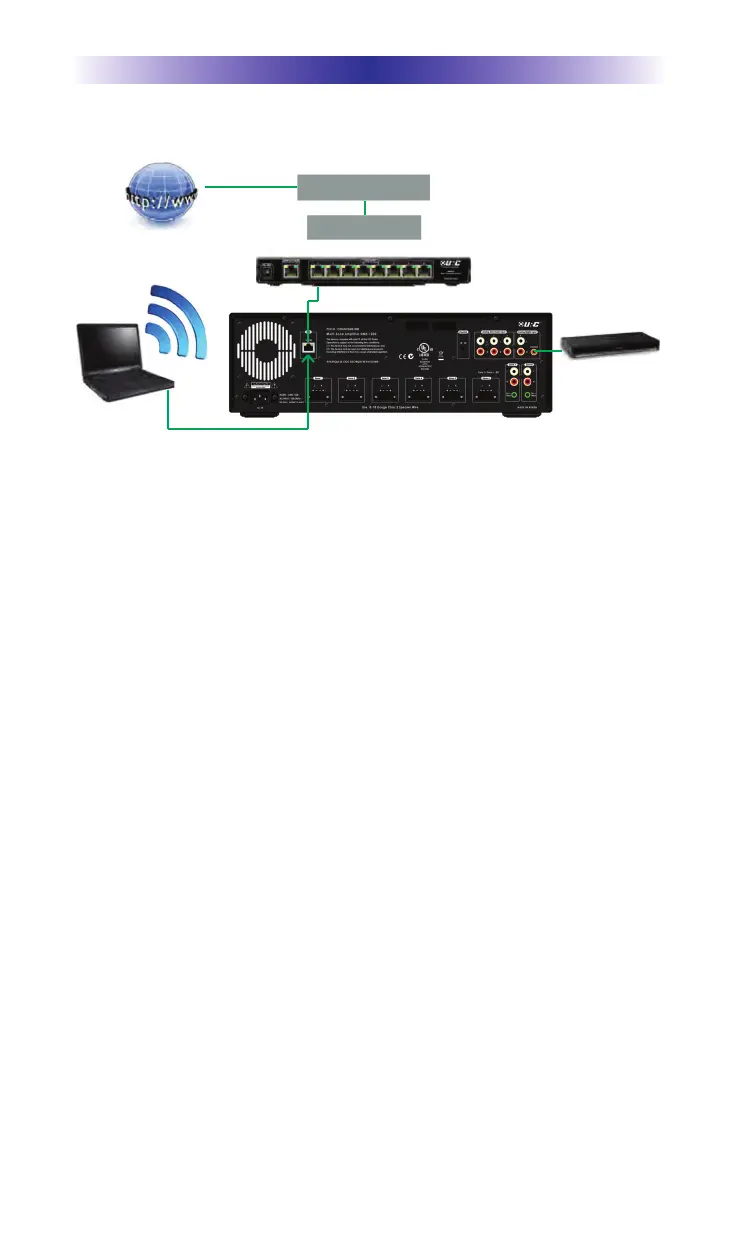
System Configuration for Internal LAN Network
Follow the steps below to connect a DMS-1200 to a LAN network.
1. Connect the Internet to the coaxial CABLE port in the rear of the
cable modem.
2. Plug in a RJ-45 ethernet connector cable via the Ethernet port of
the cable modem to the WAN port of the Router.
3. Connect a second RJ-45 cable to a LAN port of the Router and
plug the other end to the LAN 10/100 port on the rear of the
MFS-8/MFSPOE-8 network Switch.
4. Connect a third RJ-45 cable to connect the DMS-1200 LAN port to
one of the eight 10/100 Smart ports.
5. Plug the power supply to the DMS-1200 and then plug it in to an
unswitched AC outlet.
6. Connect a digital coax cable from the DVD player to the coaxial
digital input on the rear of the DMS-1200.
7. Connect a PC computer to the same LAN as the DMS-1200 or plug
an ethernet cable directly to the LAN port of the DMS-1200. Now the
computer can control and adjust the manufacturer’s audio control
program.
l
Select audio INPUT source and OUTPUT zone, MAC address etc.
This function selects input source channel and INPUT gain level
and data sent to audio equipment.
l
After selecting the output zone, adjust the zone limit power rate and
zone power ON/OFF and source signal INPUT channel.
l
Adjust the amplifier volume level per each zone for proper sound
output and maximum limitation volume level.
l
Turn on the ramp up volume level and adjust the equalizer repertory
and low volume loudness control effectiveness and custom Equalizer align.
PC
Internet
Cable Modem
WiFi Router
MFS-8
DMS-1200
DVD


 To Next Page