
 Need help?
Do you have a question about the urmet domus 1083/40 and is the answer not in the manual?
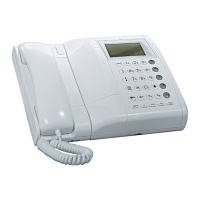
Provides a detailed breakdown of the switchboard's components and features.
Explains the functions of the dual-function buttons for calls, codes, and user names.
Details the electronic ringer modulation and volume adjustment levels.
Describes the backlit display, its rows, and information displayed based on system status.
Outlines the switchboard's operating modes: OFF, ON, Night Service, and Day Service.
Instructions for setting up the switchboard on a table using its support.
Step-by-step guide for mounting the switchboard securely to a wall.
Procedure for attaching the optional video module to the switchboard bracket.
How to power the switchboard on and off, with or without an access password.
Guide to searching the user directory and initiating calls by name.
How the switchboard handles incoming calls from apartment units, including display information.
Instructions for switching between Day and Night service modes using the SHIFT button.
How to view, select, and manage stored calls from apartment stations.
Procedure for dialing an apartment station by entering its physical or logical code.
Information on the "BUSY" display message indicating system unavailability.
How the switchboard handles calls from main call stations during concierge service.
How to activate door lock release mechanisms for main and secondary call stations.
Using decoders to manage electric actuators via special codes and function buttons.
How the LED indicates open doors and how to view the list of open doors.
Procedure for configuring the date and time settings on the switchboard.
Guide to adjusting the ringer volume level from standby mode.
How to divert calls to a cordless phone using interface Ref. 1083/67.
How user codes and names are displayed when the system uses logical codes.
Accessing the configuration menu and selecting language.
Procedure for selecting the user interface language.
Setting the assured communication time for calls.
Specifying the presence of an optional additional video module.
Setting up system parameters for one-column or multi-column configurations.
Defining the ringer repeat activation for different call types.
Enabling or disabling call interruption during off-hook waiting or assured communication time.
Configuring user codes as physical or logical, with details on their format.
Instructions for entering, modifying, and deleting user names and codes.
Restoring factory default settings for the switchboard.
Guide to programming configuration data and user directory using a PC and software.
 General
| Model | 1083/40 |
|---|---|
| Audio Channels | 1 |
| Installation | Wall-mounted |
| Wiring System | 2-wire |
| Housing Material | ABS plastic |
| Protection Class | IP30 |
| Series | Domus |
| Button | 1 door opener button |


 To Next Page


