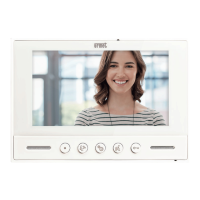
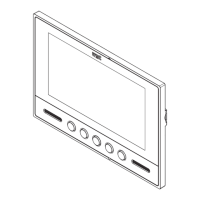
The Urmet Nexo2 is a 7-inch TFT LCD color video door phone designed for analogue video door phone systems. It supports coaxial cable connections and electronic calls, making it suitable for various residential and commercial applications. The device is available in two models: Ref. 1708/2 (white) and Ref. 1708/4 (black).
Function Description
The Nexo2 video door phone allows users to see and communicate with visitors at their door. When a call is received from an outdoor video door phone unit, the Nexo2 rings and displays the visitor's image on its 7-inch TFT LCD screen. Users can activate communication by pressing a dedicated button, and an LED indicator will blink to confirm that a conversation is in progress. The conversation can be ended by pressing the same button again.
A key feature is the ability to activate an electric lock connected to the door unit at any time by pressing a specific door opener button on the device. This provides convenient access control.
The device also includes two auxiliary buttons. These can be used for an "auto-on" function, allowing the user to manually activate the video feed from the outdoor unit, or for operating auxiliary relays to activate other electric loads, provided they are appropriately connected.
Important Technical Specifications
- Power Voltage: 18 Vdc +/- 2Vdc
- Consumption:
- Maximum: 450 mA
- Stand-by: 0 mA
- Working Power: Max 8 W
- LCD Type: 7" TFT
- Screen Size: 155 x 87 mm
- Resolution: 320H x 280V lines
- Auxiliary Contacts (X1-X2 and Y1-Y2): 50 mA @ 12 Vdc (for actuating electric loads via a relay box)
- Working Temperature Range: 0 ÷ 50 °C
- Max. Humidity: < 80%
- Dimensions (WxHxD): 202 x 142 x 22 mm
Usage Features
The Nexo2 offers several adjustable settings to customize the user experience. These settings are accessed via an on-screen display (OSD) menu, navigated using a dedicated settings menu button.
- Audio Volume Control:
- Speaker Volume during Audio Function: Adjustable across 5 levels. To increase, press and hold the settings button; release when the desired level is reached. To decrease, briefly press the settings button repeatedly.
- Speaker Volume during Call Function (Ringer Volume): Adjustable across 5 levels, using the same method as the audio function volume.
- Image Quality Control:
- Image Brightness: Adjustable across 31 levels.
- Image Colour: Adjustable across 31 levels.
- Menu Navigation:
- To access the settings menu, press the settings button for at least 1.5 seconds when the video door phone is on.
- During a conversation, briefly press the settings button to access settings.
- To exit the settings menu, press the settings button for at least 1.5 seconds, or the menu will automatically exit after 10 seconds of inactivity.
- Audio Activation: Audio communication is only possible when the display is on.
Maintenance Features
The manual provides clear instructions for installation and connection, which are crucial for proper device function and longevity.
- Installation: The device is designed for wall-mounted installation and comes with a metal bracket. It can be installed on a generic flush-moulding box (Ø 60 mm or mod. 503) using provided screws or suitable alternatives. The bracket is fixed to the wall, and then the video door phone is aligned with the couplings and slid downwards until it locks into place.
- Wiring: Connections are made using specific connectors to the video door phone and terminal boards. System conductors are then connected to the terminal boards.
- Termination Resistor: If the video door phone is installed at the end of a line, a jumper must be set to the 75 Ohm position. Otherwise, it should remain in the default ∞ (infinity) position. This is important for signal integrity in coaxial cable systems.
- Protective Film: Users are instructed to remove the protective film from the display after installation.
- WEEE Compliance: The product adheres to Directive 2012/19/EU on waste electrical and electronic equipment (WEEE). It should not be disposed of with general household waste but taken to designated collection points for recycling. This ensures environmentally responsible disposal and resource conservation.
Limitations
It is important to note that this video door phone is not designed for connection to systems using Vidicon cameras.

 Need help?
 General


 To Next Page