EasyManua.ls Logo

Urtopia Carbon E-Bike - LED Dot-Matrix Display; Voice Commands

Urtopia Carbon E-Bike
24 pages
Print Icon
To Next Page IconTo Next Page
To Previous Page IconTo Previous Page
Loading...
14
Press and hold the fingerprint/right button to activate Voice Control. Remove your finger to stop.
Voice Commands
Speed up
Speed down
Speed 1 (Eco mode)
Speed 2 (Comfort mode)
Speed 3 (Sport mode)
Speed 0 (Pedal mode)
Lights on
Lights o
Turn o the lights
Turn on the lights
Lock the bike
Lock up
Go to sleep
Power o
Volume 1
Volume 2
Volume 3
Switch
speed mode
Lights on/o
Turn right
Turn left
Lock the bike
Standby
mode
Volume
Turn left/
right
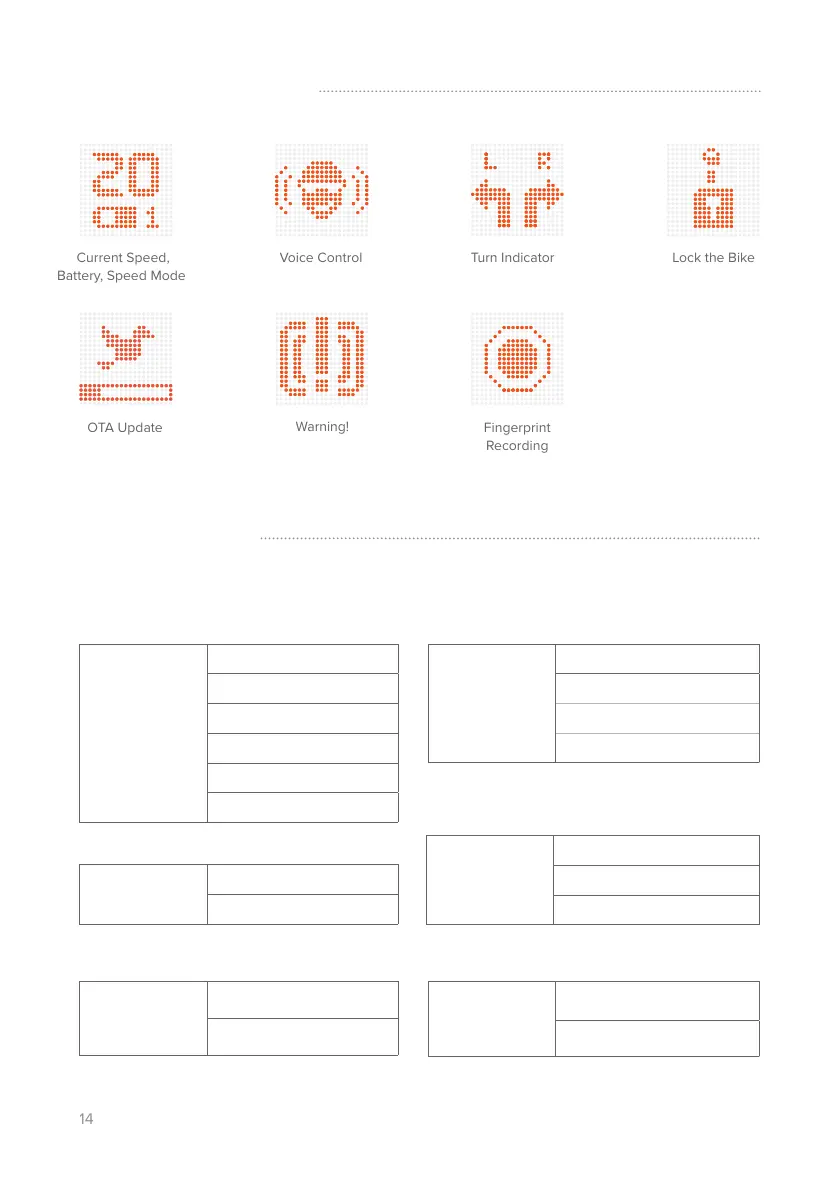
Current Speed,
Battery, Speed Mode
Lock the Bike
Warning!
LED Dot-Matrix Display
Voice Control
Turn Indicator
OTA Update
* Movement alarm is activated ONLY in Lock mode.
There is no alarm in Standby mode.