© U.S BLASTER Design - USA - P.O. Box 5376 - Carefree - AZ 85377.
USB 7392 - 7393
Microphone systems
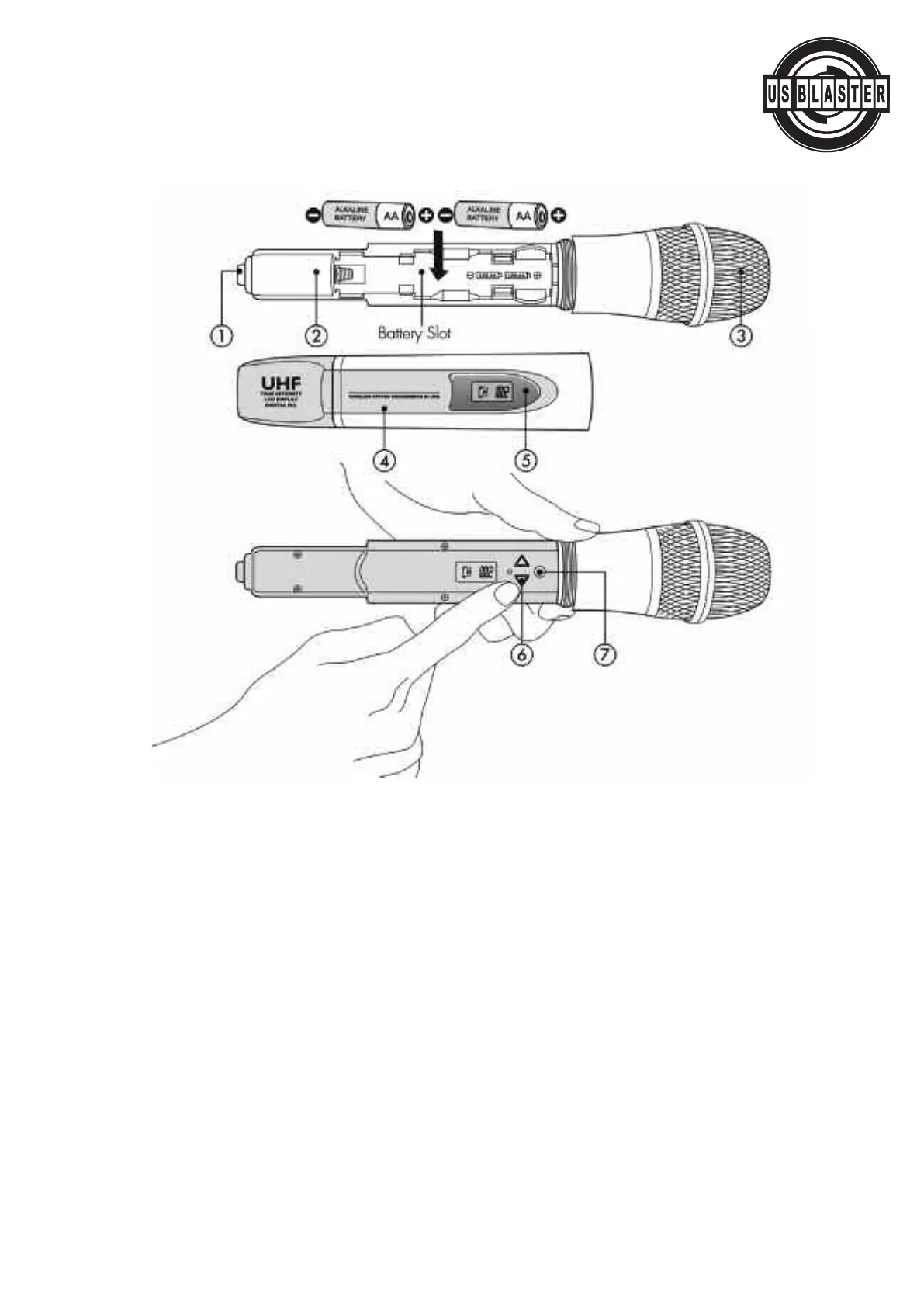
HANDHELD TRANSMITTER
1. Powerswitch:
T
o turn on press and hold the power button located on the bottom cap of the transmitter for 2-3 seconds,
until the LCD screen's light is on. To turn off press and hold the power button until LCD screen's light is off.
2. Built-in Transmitter antenna
3. Condenser and grille
4. Battery Cover: Insert 2 AA batteries into the battery slot, putting battery's polarity on different ends
ma
y damage system and your warranty may be terminated if damage does occur because of it.
5. Battery power indicator light: If this light is flashing it means the battery power is low and must
be replaced.
6. up and down buttons: Adjustment buttons to change system statuses.
7. Set button: Opens the different statuses y
our system lets y
ou adjust, and confirms adjustments.
NOTE: After using set and the up and down buttons to adjust y
our receiv
er's status, press set again to
confirm, or y
our adjustments will remain the same.
© US Blaster Europe BV



 To Next Page