MODEL MIC1509S
PLEASE READ AND SAVE!
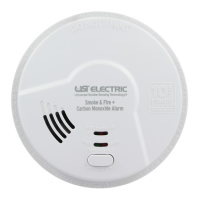
THANK YOU for purchasing this 3-in-1 Smoke + Fire + Carbon Monoxide Smart Alarm.
This alarm contains a 10 year permanent power sealed battery to provide continuous
protection--even in the event of a power outage. The sealed battery will last for approx-
imately 10 years. This manual includes important information regarding where to install
the alarm, how to operate, maintenance, testing and product features. It also includes
tips and information which could help protect you and your family.
TABLE OF CONTENTS
Alarm Technology & Key Product Features ..........................2
Alarm Limitations and Functions ...................................2
Installation Instructions ...........................................3
Where This Alarm Should Be Installed .......................3
Where This Alarm Should Not Be Installed ....................5
Mounting Instructions .....................................6
Tamper Resistant (Alarm) Locking Feature ....................6
Wiring Instructions .......................................7
Stand Alone Alarm Installations .............................7
Interconnected Alarm Installations ..........................8
Interconnection & Compatibility .............................9
Industry & Agency Recommendations .............................10
Alarm Operation ................................................10
Normal Operation ......................................10
Trouble Signal .........................................11
Alarm Reset ...........................................11
Quick Find® Alarm Origination ............................11
Silence Feature ........................................11
Testing Instructions ......................................12
Alarm & Battery Deactivation .....................................12
What To Do If Alarm Sounds—Carbon Monoxide Detected ............13
What You Should Know about Carbon Monoxide . . . . . . . . . . . . . . 13
Symptoms of CO .......................................13
Required CO Alarm Levels ................................14
Response to CO Alarm Sounding ..........................14
Potential Sources of CO ..................................14
What To Do If Alarm Sounds—Smoke Detected ......................15
How Can I Protect My Family from Fire .....................15
Develop An Escape Plan .................................15
Quick Reference Guide
Troubleshooting Information ..............................16
Warranty .....................................................18
Alarm Returns .........................................18
Repairs and Service ....................................18
Regular Maintenance ....................................18


 To Next Page
 General