ASSEMBLY INSTRUCTIONS
2. For best results, select a site to mount the fixture 6 to
7 feet above the ground. Do not mount light near other
sources of heat that lie in the detection area (i.e. dryer
exhaust vents, lights, etc.) or reflective surfaces (i.e. pool
water or white walls). Overhanging branches may cause
false activation under extreme conditions. DO NOT
mount behind a window for outdoor detection. Sensor
will not detect heat or motion through glass, clear acrylic
or plastic.
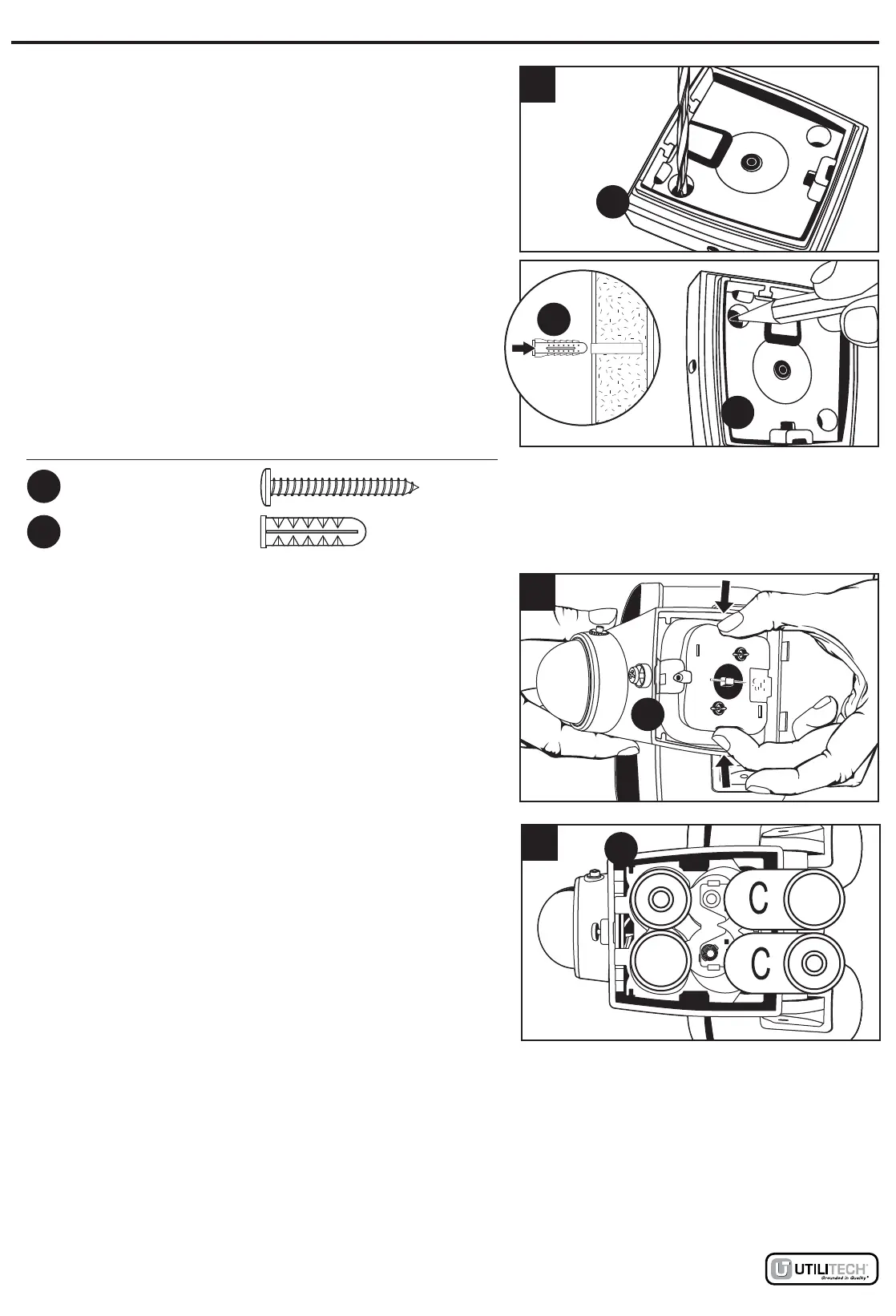
In order to mount the rear housing cover (D), mounting
holes must be drilled out. Place rear housing cover (D)
over the mounting location and mark the center of the
holes to be drilled into the mounting surface. Drill a 1/16
inch pilot hole into the surface. For mounting to concrete
or masonry, install the anchors (BB), by drilling two
3/16-in. pilot holes into the surface. Insert the anchors
(BB) into the holes and tap them into place so they are
flush with the surface. Fasten rear housing cover (D) to
mounting surface with wood screws (AA).
3. Remove the battery compartment door on the fixture
(A) by grasping the catches located on the right and left
sides of the door, and squeeze together until the
catches release the door from the fixture (A).
BB
2
Hardware Used
Anchor
BB
x 2
Wood
Screw
AA
x 2
3
A
4. Insert 4 new alkaline C cell batteries (not included) into
the battery compartment according to the "+" and "-"
markings at the bottom of the battery compartment. Cold
weather can have a negative impact on battery life. Do
not mix old and new batteries.
Re-attach the battery compartment cover by pressing the
cover down over the battery compartment until the cover
"clicks" into place. Note: Batteries will not make proper
contact if the battery compartment cover is not attached
correctly.
4
A
D
D
Lowes.com
3


 To Next Page