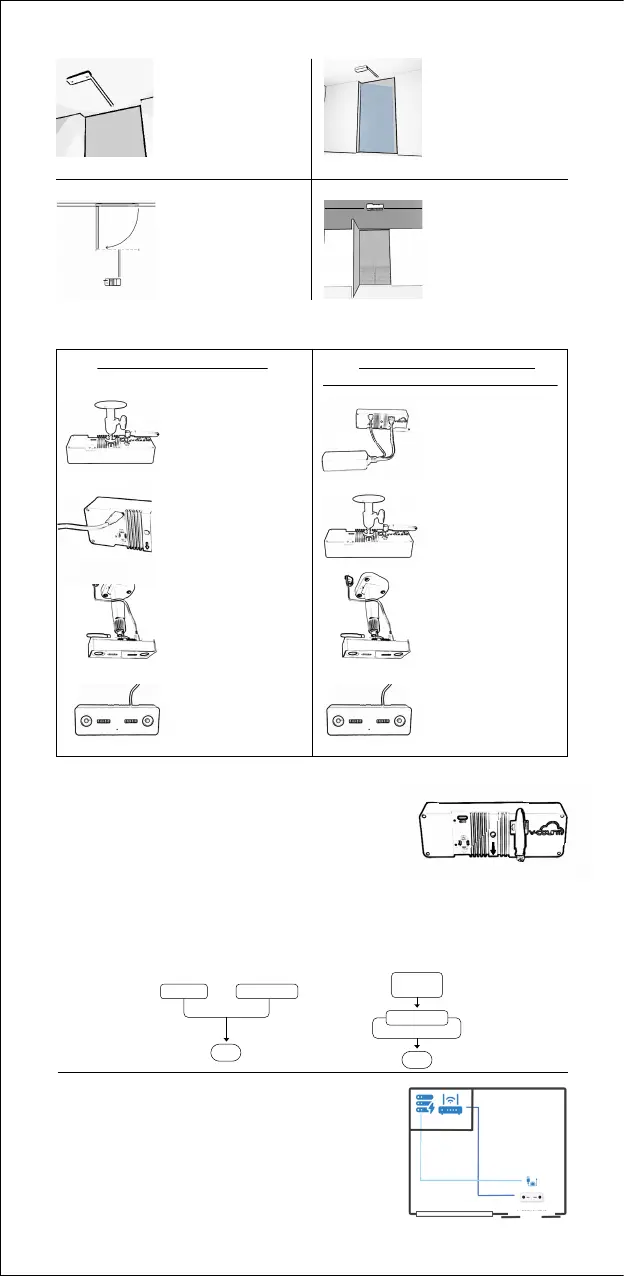
For Wi-Fi Connection
For Cable Connection
Attach the bracket by
rotating it to the top
of Nano.
Step-2: Installation Summary
Plug the USB-C cable
into the USB slot at the
back of Nano.
1.
2.
3.
4.
Install Nano on the
ceiling (Please refer to
the “Installation Point”
section in the first step.)
Wait for the green
light on the front of
Nano to turn on.
Place the PoE Switch on
the PoE Splitter and the
PoE Splitter on the back
of Nano. Attach the
bracket by rotating it to
the top of Nano.
Attach the bracket by
rotating it to the top
of Nano.
1.
2.
3.
4.
Install Nano on the
ceiling (Please refer to
the “Installation Point”
section in the first step.)
Wait for the green
light on the front of
Nano to turn on.
*PoE Splitter is not included in the box, it is optional
Sliding Doors
If the door(s) don't block
the sensor, position it
60 cm from the entrance,
starting from the door.
Door Opening Inside
If the door(s) might
obstruct the sensor,
position it about 60 cm
from the door's fully
open state.
Door Opening
Outside
If the door(s) don't
obstruct the sensor,
position it 60 cm
away from the door.
Alignment
Position the sensor at the
center of the entrance.
For multiple sensors,
scan the detailed guide
QR on the front page.
Step-3: Determine the Installation Direction
Please ensure the unit is installed in a top-down position where
the arrow indicates the entrance direction.
Ensure the unit is installed in a top-down position with the arrow
indicating the entrance direction (Pointing outside).
Step-4: Ethernet & Power Cabling
Nano sensor requires an internet connection to transmit traffic data to V-Count servers.
Please refer to the installation diagrams for various installation options.
Protips
Please ensure that any extension of the adaptors is
limited to the AC side, as extending the DC side may
lead to unpredictable behavior, depending on the
quality of the adaptor utilized. It is not recommended to
extend the DC side.
60 cm
60 cm
60 cm
Adaptor Data Switch
9V-36V, min 7.2W
Adaptor Option PoE Splitter Option
Nano
Nano
PoE
Switch
PoE Splitter
Power
Data
AC Side of the
adaptor must
be extended
Cat 5/6
Cable
5V 2A Adaptor
UPS
Modem
Nano
Technical Room
1 m 1 m
Installation
Diagram
Top-Down View


 To Previous Page
 Loading...