verza manual v1.0 6
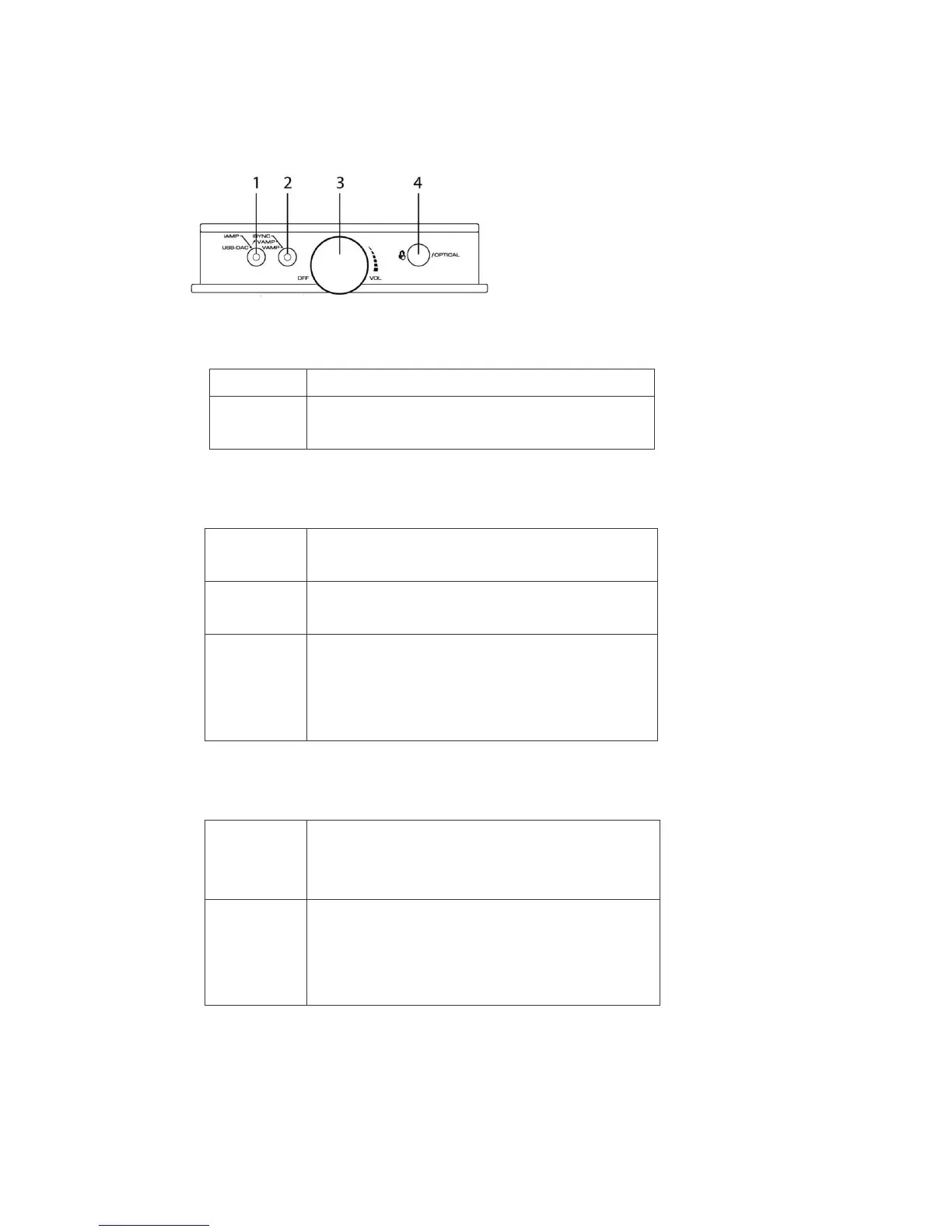
Name and Function of Each Part
Front panel
1. Toggle switch (1)
Set the functions.
Function to listen to the music in iPod/iPhone.
Function to connect VERZA with computer or devices with
USB audio. To listen to the music after connected.
2. Toggle switch (2)
Set the modes.
Listen to the music in iPod/iPhone with headphones (or
speakers) using the AMP (amplifier) of VERZA.
In addition to the AMP (amplifier) function, iPod/iPhone gets
charged by the built-in battery of VERZA.
Perform ON and OFF of the connection between VERZA and
iPod/iPhone.
Perform the synchronization with iPod / iPhone and computer
and charge iPod/iPhone from computer, USB charger, etc.
3. Power switch volume knob
Adjust the output volume to headphones (or speakers).
Volume increases when turned clockwise. The volume
decreases when turned counterclockwise.
The main power turns ON when the knob is turned clockwise
and clicks.
The main power turns OFF when the knob is turned
counterclockwise all the way and clicks.


 To Next Page
 Loading...