EasyManua.ls Logo

V-tech IS7121A - User Manual

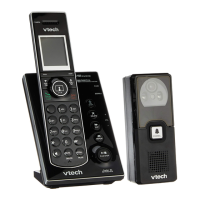
V-tech IS7121A
81 pages
Print Icon
To Next Page IconTo Next Page
Loading...
http://hkphones.v tech.com
Models: IS7121A
IS7121-2A
User’s Manual

Table of Contents

Questions and Answers

Summary

Important Safety Instructions

Set Up The Telephone

Package Contents

Lists all items included in the telephone package for setup.

Location

Guidelines for placing the base unit for optimal coverage and reduced interference.

Connect the Base Station

Instructions for connecting the telephone base to power and phone line.

Connect the Charger Base

Instructions for connecting the charger base to the power outlet.

Install and Charge the Handset Batteries

Steps for installing rechargeable batteries into the handset and charging.

Installation Options

Overview of different installation options for the telephone base.

Tabletop to Wall Mount Installation

Steps to convert a tabletop telephone base installation to a wall mount.

Wall Mount to Tabletop Installation

Steps to convert a wall-mounted telephone base installation to tabletop.

Doorbell Battery Installation

Instructions for installing batteries into the doorbell unit.

Locating the Doorbell

Guidance on testing doorbell location and adjusting camera angle for optimal view.

Install the Doorbell Wall Mount Cover

Steps for marking and drilling holes for the doorbell wall mount bracket.

Install the Doorbell

Instructions for securely attaching the doorbell to its wall mount.

Untach Doorbell From Wall Mount Cover

Steps to safely remove the doorbell from its wall mount cover.

Get To Know Your Phone

Overview of the Handset

Explanation of the handset's features, buttons, and indicators.

Overview of the Base Station

Explanation of the base station's buttons, lights, and features.

Overview of the Doorbell

Identification and explanation of the doorbell's components.

Handset LCD Display Icons and Symbols

Description of icons displayed on the handset's LCD screen.

Menu Structure

Overview of the phone's menu hierarchy and navigation.

Text and Digit Entry Table

Table showing alphanumeric character input for names and numbers.

Phone Settings

Handset Ringer Volume

How to adjust the ringer volume or turn it off for each handset.

Telephone Base Ringer Volume

How to adjust the ringer volume for the telephone base unit.

Ringer Tone

How to select different ringer tones for each handset.

Chime Volume

How to adjust the chime volume for the base or handset, or turn it off.

Chime Tone

How to select different chime tones for the base or handset.

Quiet Mode

How to set a period where calls and tones are muted automatically.

Set Date and Time

Instructions for setting the date and time for the answering system.

Rename Devices

How to assign custom names to handsets and the doorbell.

Voice Announce Caller ID

How to enable voice announcements for incoming caller ID information.

LCD Brightness

How to adjust the brightness of the handset LCD screen for readability.

Dim Mode

How to set the handset backlight to dim or completely off when idle.

Wall Paper

How to select a wallpaper image for the handset display.

Clear Voicemail Indicators

How to clear voicemail waiting indicators on the handset.

Key Tone

How to adjust the volume or turn off key press tones on the handset.

Call Divert

How to set up or turn off call diverting for doorbell calls to an external number.

Using the Doorbell

Answer a Chime

How to answer a chime from the doorbell and capture a visitor's photo.

Start a Video Streaming Session

How to initiate a live video streaming session from the doorbell.

Extend a Video Streaming Session

How to extend an active video streaming session duration.

End a Video Streaming Session

Instructions on how to end an active video streaming session.

Answer an Incoming Call During Video Streaming

How to handle an incoming call while viewing doorbell video stream.

View Captured Photos

How to view photos previously captured by the doorbell.

Delete a Captured Photo

How to delete a single captured photo from the doorbell's memory.

Delete All Captured Photos

How to delete all captured photos from the doorbell's memory.

Night Vision

Information about the doorbell's infrared LEDs for night vision imaging.

Using the Phone

Make a Home Call

Instructions for making outgoing calls from the handset.

Preparatory Dialing

How to make a call by dialing the number before pressing TALK.

Direct Dialing

How to make a call by pressing TALK then dialing the number.

Answer a Call

How to answer an incoming call on the handset.

End a Call

How to end an active call by hanging up or returning handset to base.

Handsfree

How to switch between speakerphone and handset earpiece during a call.

Volume Control

How to adjust the listening volume during a call.

Mute

How to mute the microphone during a call so the other party cannot hear you.

Call Waiting

How to handle incoming calls when already on a call.

Temporary Ringer Silencing

How to temporarily silence the ringer without disconnecting.

Temporary Tone Dialing

How to switch to tone dialing for accessing services like banking.

Chain Dialing

How to dial sequences from stored numbers during an active call.

Find Handset

How to locate a misplaced handset by initiating a paging tone.

Redial

How to review and dial numbers from the last 10 dialed entries.

Equalizer

How to adjust handset audio quality using equalizer settings.

Transfer a call

How to transfer an outside call from one system device to another.

Join a Call in Progress

How to join an existing call with another handset.

Intercom

How to use the intercom feature for conversations between handsets.

Answer an Incoming During an Intercom Call

How to answer an external call while on an intercom call.

Call Transfer Using Intercom

How to transfer an outside call using the intercom feature.

Phonebook

Create and Review Entries

How to add, edit, and view contacts in the phonebook.

Create a New Entry in the Phonebook

Steps for adding a new contact with number and name to the phonebook.

Add a Predialled;Redial List Number to the Phonebook

How to save numbers from predialed or redial lists to the phonebook.

View the Phonebook

How to browse and view all entries stored in the phonebook.

Alphabetical Search

How to perform an alphabetical search within the phonebook entries.

Dial, Edit or Delete a Phonebook

Functions for dialing, editing, or deleting phonebook entries.

Dial a Phonebook Entry

Steps to dial a contact directly from the phonebook.

Edit a Phonebook Entry

Steps to edit an existing phonebook entry's number or name.

Delete a Phonebook Entry

Steps to delete a specific contact entry from the phonebook.

Speed Dial

Instructions on assigning and using speed dial numbers.

Assign a Speed Dial Phonebook Entry

Steps to assign phonebook entries to speed dial slots.

View the Speed Dial Phonebook

How to view the list of entries assigned to speed dial slots.

Dial a Speed Dial Entry

How to dial a number using a speed dial entry.

Reassign a Speed Dial Entry

How to change an existing speed dial assignment to a different entry.

Delete a Speed Dial Entry

How to remove a speed dial assignment from a slot.

Call Log

Caller ID

Information about viewing caller ID and call log entries.

View the Call Log

How to review the history of incoming and outgoing calls.

Dial a Call Log Entry

How to dial a number directly from a call log entry.

Save a Call Log Entry to the Phonebook

How to save a call log entry into the phonebook.

Delete a Single Entry in the Call Log

How to delete one specific entry from the call log.

Delete the Entire Call Log

How to delete all entries from the call log.

Call Log Screen Messages

Explanation of different messages displayed in the call log.

Answering Machine

Answer On;Off

How to turn the answering system on or off.

Outgoing Messages

How to manage outgoing greeting messages.

Play Your Outgoing Messages

How to play the current outgoing greeting message.

Record Your Own Outgoing Messages

How to record a personalized outgoing greeting message.

Delete Your Outgoing Messages

How to delete recorded outgoing greeting messages.

Message Playback

How to listen to new and old recorded messages.

Delete All Old Messages

How to delete all previously listened-to messages.

Record and Play Memos

How to record and play personal memo messages.

Answering Machine Settings

Overview of settings for the answering system.

Call Screening

How to listen to callers leaving messages at the telephone base.

Number of Rings

How to set the number of rings before the answering system answers.

Remote Access Code

How to change the security code for remote access to the answering system.

Message Alert Tone

How to enable or disable the alert tone for new messages.

Temporarily Turn Off the Message Alert Tone

How to temporarily silence the new message alert tone.

Recording Time

How to set the maximum recording time for each incoming message.

Answering System and Voicemail

Differentiates between built-in messages and voicemail.

Using the Answering System and Voicemail Together

How to use the answering system and voicemail concurrently.

Message Capacity

Information on message storage capacity and limits.

Voice Prompts

Information about system voice prompts for setup guidance.

Call Screening at the Telephone Base or Handset

Details on performing call screening from the base or handset.

Call Intercept

How to stop recording a message and talk to the caller.

Remote Access

How to access the answering system remotely from any touch-tone telephone.

Remotely Access the Answering System

Steps to access the answering system remotely via phone.

Remote Commands

Lists commands for remote access of the answering system functions.

Registration

Registration

General information about registering handsets and doorbells to the base.

Easy Registration for Additional Handset

Steps for easily registering a new handset to the telephone base.

Easy Registration for Additional Doorbell

Steps for easily registering a new doorbell to the telephone base.

Deregister Handsets and Doorbells

How to remove registered handsets and doorbells from the system.

Default Settings

Troubleshooting

Technical Specifications

Care and Maintenance

V-tech IS7121A Specifications

General IconGeneral
BrandVTech
ModelIS7121A
TypeCordless Phone
Number of Handsets1
Answering SystemYes
Caller IDYes
Call WaitingYes
DECT 6.0 TechnologyYes
SpeakerphoneYes
ExpandableYes
Phonebook Capacity50
Battery TypeNi-MH
Frequency1.9 GHz
IntercomYes
Answering System TypeDigital
RangeUp to 1, 000 feet