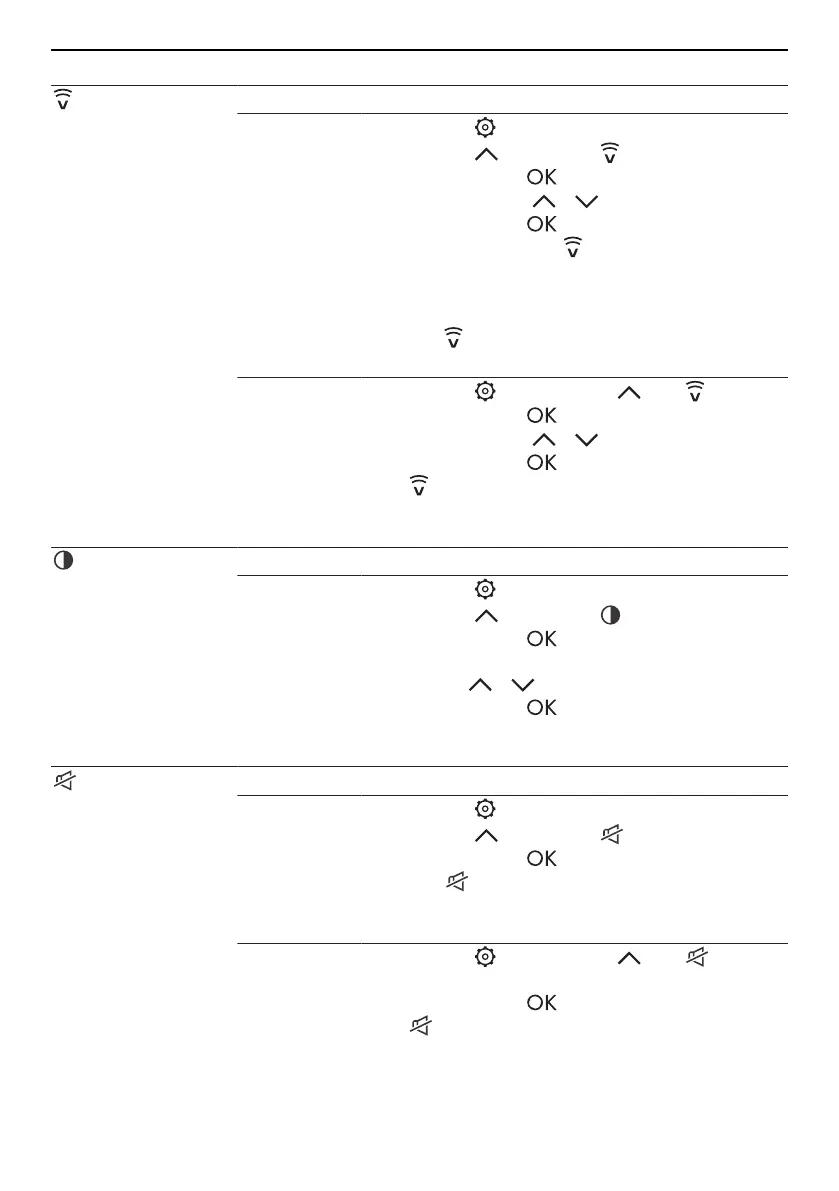
5 Using the appliance functions
Function Description
V-ZUG-Home Interaction with the appliance via the app (see page 18).
Activating
▸ Touch the button.
▸ Select the button until appears flashing.
▸ Confirm with the button and select «On» in
the display using / .
▸ Confirm with the button.
– The connection to is activated and shown
in the display.
– Follow the instructions in the app.
▪ Select «rS» in the display to reset the connec-
tion to .
Deactivating
▸ Touch the button, select until appears.
▸ Confirm with the button and select «OF» in
the display using / .
▸ Confirm with the button.
– is deactivated and no longer shown in the
display.
Display bright-
ness
Adjusting the level of brightness for the display.
Selection
▸ Touch the button.
▸ Select the button until appears flashing.
▸ Confirm with the button.
▸ Select the desired level of brightness (1/2/3)
using the / buttons.
▸ Confirm with the button.
– The setting is accepted.
Switch off button
tone
Switching the button tone on/off.
Activating
▸ Touch the button.
▸ Select the button until appears flashing.
▸ Confirm with the button.
– The setting is activated and shown in the
display.
Deactivating
▸ Touch the button, select until ap-
pears.
▸ Confirm with the button.
– is deactivated and no longer shown in the
display.
15


 To Next Page