7
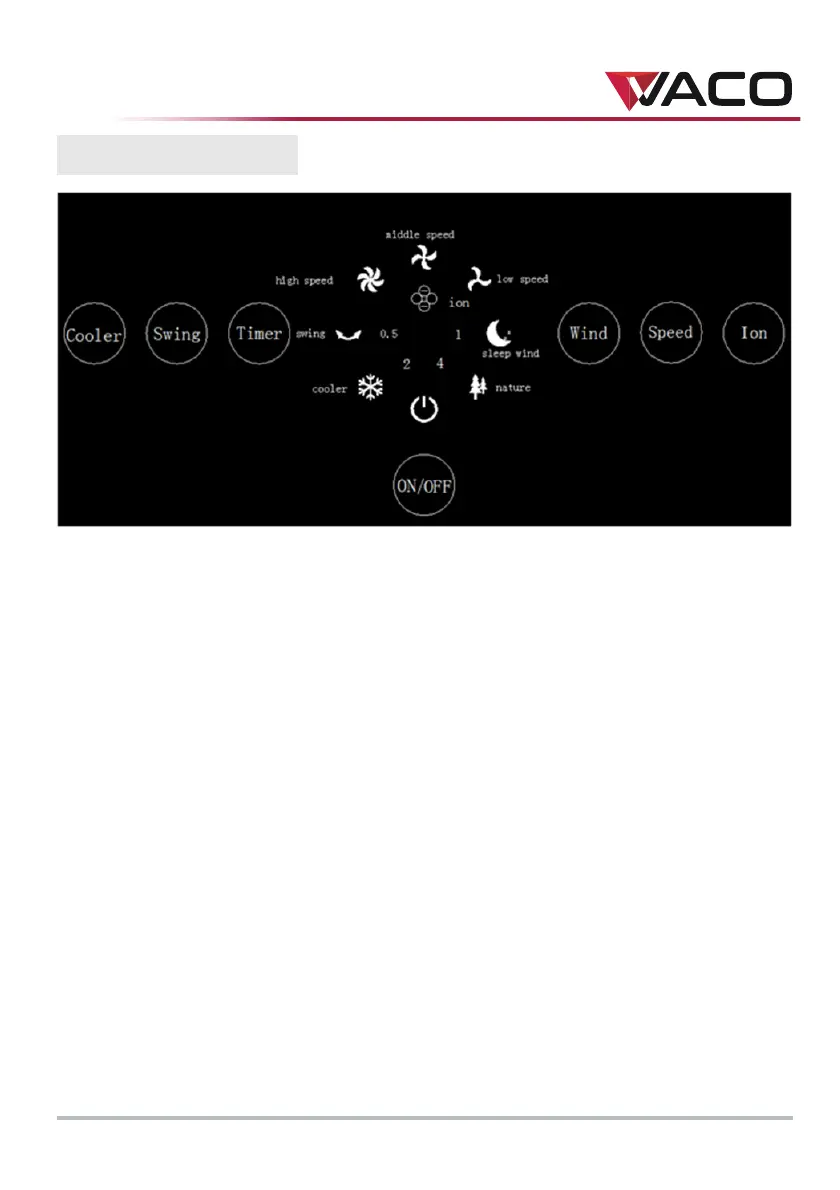
CONTROL PANEL
1. "ON/
OFF"
button
Press the b
utton to start the appliance at "LOW" speed.
Press the button again to stop the
appliance.
2. "SPEED" button
Press the b
utton while the appliance cooler is running to switch to "MIDDLE"
speed.
Press the button again to switch to "HIGH" sp
eed.
Press th
e button once more to swit
ch to "LOW" speed.
3. "TIMER
" button
Press the button while the appliance is running to automatically turn it off in
0.5 ho
urs.
Press th
e button again to automatically turn the appliance off in 1 hour.
Press the button once more to automatically turn the appliance off in 1.5hou
rs.
Each subsequent press of
the button will increase the operating time
by another
0.5 h
ours, to a maximum of 7.5 ho
urs
4. "SWING" button
Press the b
utton while the appliance is running to supply a mix of warm and
cool
air.
5. "COOLER"
bu
tton
Press the b
utton while the appliance is running to enter "COOL" mode.
6. "ION" button
Press the button while the appliance is running to enable the "ION"
function.


 To Next Page