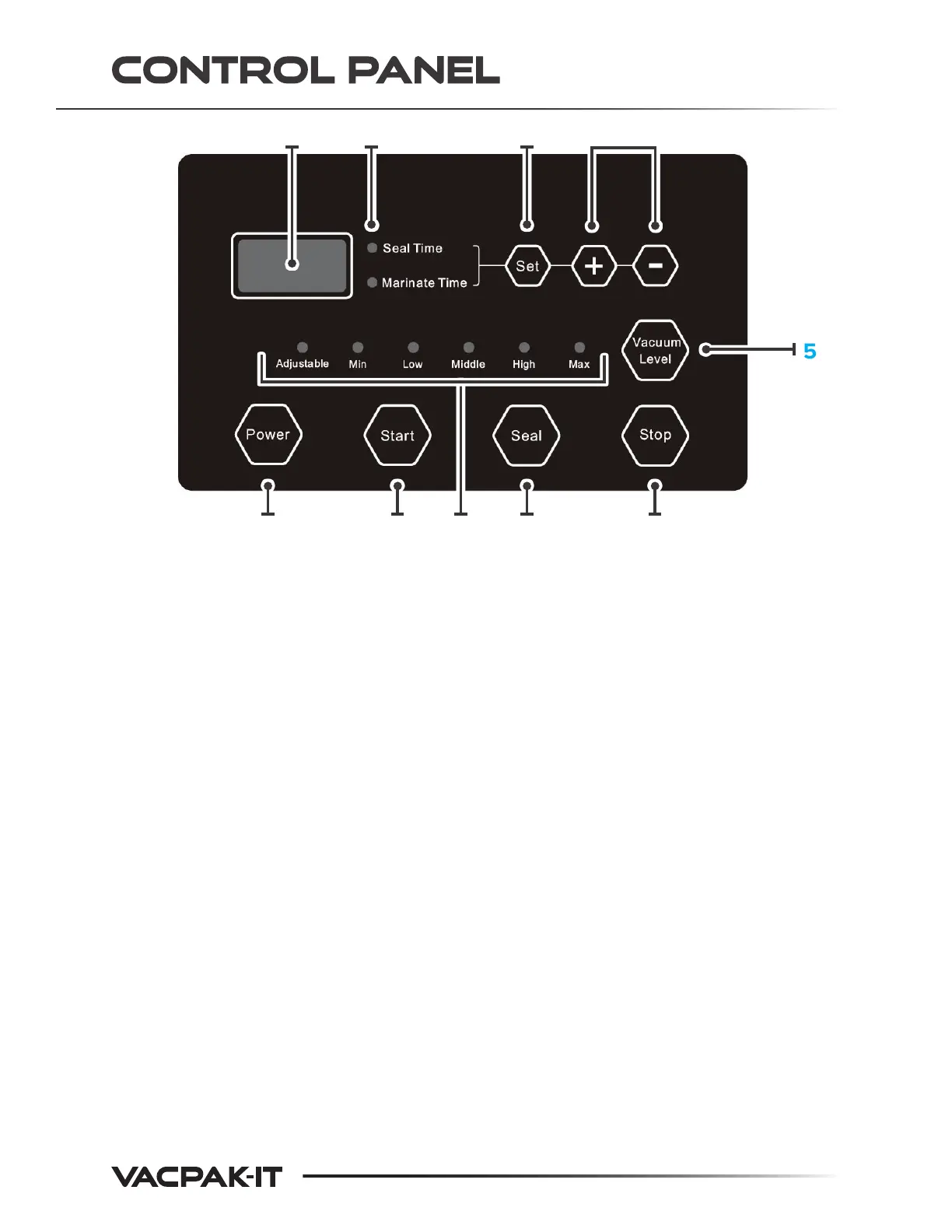
1. LED Display - Displays current cycle time in seconds.
2. Working Mode Indicator - Illuminates when working.
3. Set Button - Press to set the vacuum or sealing time, then use the
plus/minus buttons to make adjustments.
4. Adjustable Button - Adjusts seal time, marinate time, or vacuum
degree.
5. Vacuum Level - Press button to select vacuum degree. When
Adjustable Button is selected, the vacuum degree can be set
independently with the plus/minus keys.
6. Stop Button - Press to stop the vacuum cycle and seal the
bag immediately.
7. Seal Button - Press to seal the bag under vacuuming immediately.
This is to prevent fragile items from crushing.
8. Vacuum Level Indicator - Illuminates when working.
9. Start Button - Automatically begins to vacuum and seal.
10. Power Button- Turns machine on. After pressing this button, the LED
1 2 3 4
67910 8
5
4.


 To Next Page