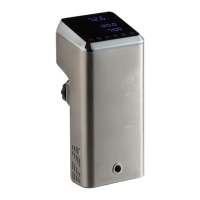
This document describes the VacPak-It Sous Vide Immersion Circulator, a device designed for precise temperature control of water in a closed-loop circulation system, primarily for commercial food service establishments.
Function Description
The VacPak-It Sous Vide Immersion Circulator is used to heat and circulate water in a container, allowing for precise temperature cooking of food. It maintains a consistent water temperature, which is crucial for sous vide cooking. The device is designed to be attached to a water bath container via an adjustable clamp, ensuring it is fixed firmly. It can heat and circulate up to 8 gallons of water.
Important Technical Specifications
The manual provides specifications for two models: SV158 and SV158KIT.
- Model SV158:
- Description: Sous Vide Immersion Circulator (Head Only)
- Voltage: 120V
- Wattage: 1800W
- Amps: 12.5 Amps
- Plug: 5-15P
- Model SV158KIT:
- Description: Sous Vide Immersion Circulator Head & 8 Gallon Water Tank
- Voltage: 120V
- Wattage: 1800W
- Amps: 12.5 Amps
- Plug: 5-15P
A water container with a minimum depth of 6 inches is required for use with this equipment. The unit is intended for indoor use only.
Usage Features
The device features a control panel with an LCD screen that displays various information and allows for setting adjustments.
Key components and their functions:
- Control Panel: The main interface for operating the device.
- Cooling Fan (Inside): Helps regulate the internal temperature of the unit.
- Adjustable Clamp: Secures the circulator head to the water bath container.
- Water Level Indicators (MAX/MIN): Mark the acceptable range for the water level in the container.
- Heating Element (Inside): Responsible for heating the water.
- Pump (Inside): Circulates the water to maintain a consistent temperature.
Control Panel Features:
- Temperature Display: Shows the current water temperature.
- Wireless Network Indicator Light (if applicable): Indicates connectivity status.
- Water Heating Indicator Light: Illuminates when the water is being heated.
- Water Circulating Indicator Light: Illuminates when the water is being circulated.
- Temp/Time Button: Used to switch between adjusting temperature and time settings.
- °C/°F Button: Toggles the temperature display between Celsius and Fahrenheit.
- Increase/Decrease Buttons: Used to adjust temperature or time settings up or down.
- Set Temperature Display: Shows the desired water temperature.
- Time Display: Shows the remaining heating/holding time.
- Start/Stop Button: Initiates or halts the operation.
- Power Button: Turns the unit on or off.
Operating Instructions:
- Select Container: Choose a water container with at least a 6-inch depth. The unit can heat and circulate up to 8 gallons of water.
- Attach Circulator Head: Securely attach the circulator head to the container using the adjustable clamp.
- Fill Water: Fill the container with water until it is between the MAX and MIN fill lines on the circulator head.
- Plug In: Connect the machine to a grounded electrical outlet that matches the nameplate voltage. The LCD screen will light up.
- Adjust Controls: Set the desired temperature and time using the control panel buttons.
Safety Instructions:
- Use only grounded electrical outlets matching the rated voltage.
- Installation should be done by qualified personnel according to local codes.
- Operate on a flat, level surface.
- Do not use damaged cords or extension cords.
- Avoid plugging into power strips or multi-outlet cords.
- Unplug before cleaning or moving.
- Do not spray controls or exterior with liquids or cleaning agents.
- Do not clean with steel wool.
- Keep equipment and power cord away from open flames, electric burners, or excessive heat.
- Do not operate in public areas or around children.
- Do not operate if damaged or malfunctioning.
- Use only for its intended purpose.
- Do not use to heat oil, grease, or any liquid other than water.
- Do not put hands directly in the water.
- The machine may remain hot after use.
Maintenance Features
Regular maintenance is recommended to extend the life of the unit.
- Cleaning Frequency: Clean every 20 uses or 100 hours of use.
- Circulator Cleaning:
- Fill a container with a solution of water and vinegar.
- Turn the circulator head on and let it circulate for 20 minutes.
- Repeat the process with clean water to rinse.
- Filter Cleaning:
- Unplug the machine and allow it to cool down.
- Open the machine housing.
- Use a soft brush to remove particles from the filter.
- Storage:
- Store the model in an upright position to prevent water from leaking into the top portion.
- If liquid enters the top part, turn off the power and dry with a clean towel before use.
Troubleshooting:
- No power to the unit:
- Ensure proper connection to a grounded outlet.
- Check the power cord for damage (tears, frays). Do not use if damaged.
- Unit no longer heating:
- Verify that the water level is between the MIN and MAX fill lines. If not, allow the unit to cool and add water until the level is within these marks.
Warranty:
VacPak-It offers a 1-year limited warranty against defects in material and workmanship from the date of purchase. This warranty is exclusive to the original purchaser and covers repair or replacement at VacPak-It's discretion. The warranty is not transferable. Equipment installed in a food truck or trailer has a limited 30-day warranty. Claims must be made by contacting the place of purchase (WebstaurantStore.com or The Restaurant Store) with the order number ready. Failure to contact the designated location prior to obtaining service may void the warranty.
The warranty explicitly disclaims all implied warranties, including merchantability and fitness for a particular purpose. It does not cover:
- Use outside the Continental United States.
- Use of unfiltered water (if applicable).
- Wearable parts not covered under warranty (at VacPak-It's discretion).
- Equipment not purchased from an authorized dealer.
- Residential or non-commercial use.
- Alterations, modifications, or repairs by unauthorized service agencies.
- Removed or altered serial number plates.
- Damage due to improper installation, utility connection, supply, ventilation, or airflow.
- Damage due to improper maintenance, wear and tear, misuse, abuse, vandalism, or Acts of God.
Any action for breach of warranty must be commenced within 1 year of the breach date. The warranty is governed by the laws of the Commonwealth of Pennsylvania. VacPak-It is not liable for incidental or consequential damages, including loss of profits.


 To Next Page
 General