Troubleshooting
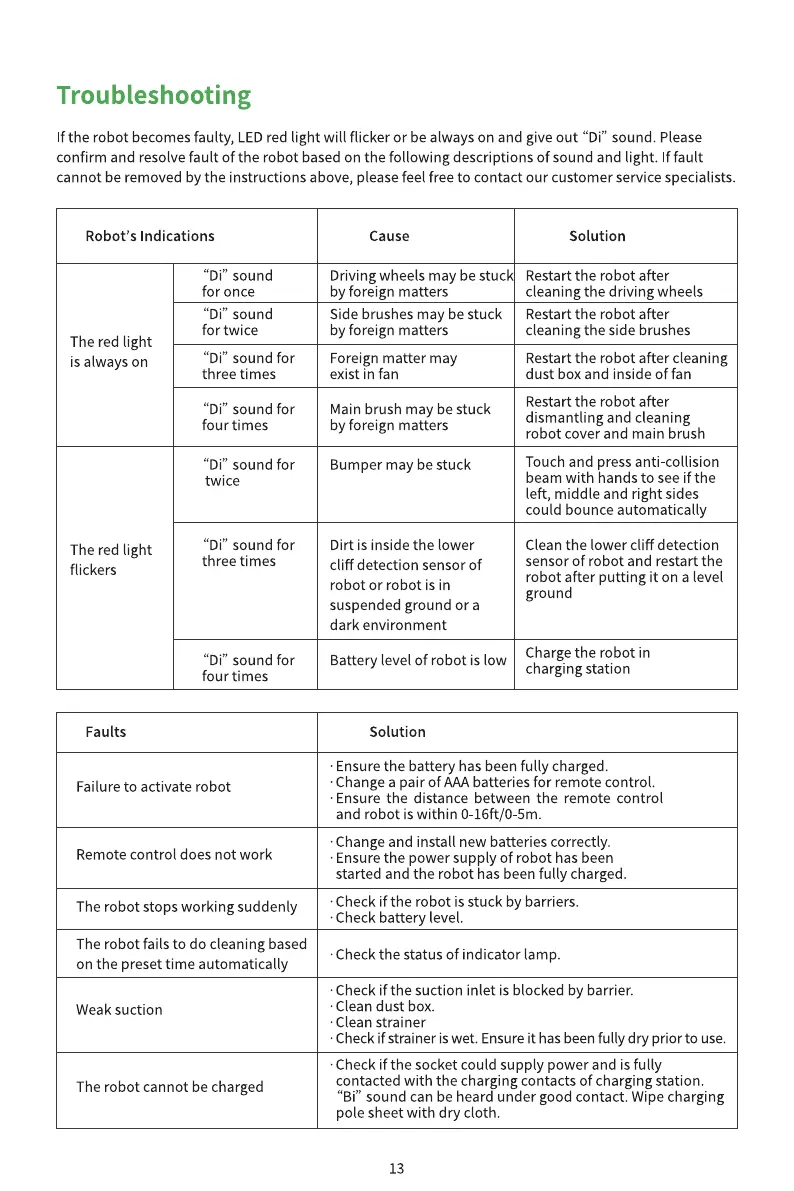
f the robot becomesfaulty, LEDred light will flicker or be always on and give out "Di" sound. Please
confirm and resolve fault of the robot based on the following descriptions of sound and light. If fault
cannot be removed by the instructions above, please feel free to contact our customer service specialists.
Robot's Indications
The red light
is always on
The red light
flickers
Faults
"Di" sound
for once
"Di" sound
for twice
"Di" sound for
three times
"Di" sound for
four times
"Di" sound for
twice
"Di" sound for
three times
"Di" sound for
four times
Cause
Driving wheels may be stuc
by foreign matters
Side brushes may be stuck
by foreign matters
Foreign matter may
exist in fan
Main brush may be stuck
by foreign matters
Bumper may be stuck
Dirt is inside the lower
cliff detection sensor of
robot or robot is in
suspended ground or a
dark environment
Battery level of robot is low
Solution
Solution
Restart the robot after
cleaning the driving wheels
Restart the robot after
cleaning the side brushes
Restart the robot after cleaning
dust box and inside of fan
Restart the robot after
dismantling and cleaning
robot cover and main brush
Touch and press anti-collision
beam with hands to see if the
left, middle and right sides
could bounce automatically
Clean the lower cliff detection
sensor of robot and restart the
robot after putting it on a level
ground
Charge the robot in
charging station
Failure to activate robot
Remote control does not work
The robot stops working suddenly
The robot fails to do cleaning based
on the preset time automatically
Weak suction
The robot cannot be charged
•Ensure the battery has been fully charged.
•Change a pair of AAA batteries for remote control.
•Ensure the distance between the remote control
and robot is within 0-16ft/0-5m.
•Change and install new batteries correctly.
•Ensure the power supply of robot has been
started and the robot has been fully charged.
•Check if the robot is stuck by barriers.
•Check battery level.
•Check the status of indicator lamp.
Check if the suction inlet is blocked by barrier.
Clean dust box.
•Clean strainer
•Check if strainer is wet. Ensure it has been fully dry prior to use.
•Check if the socket could supply power and is fully
contacted with the charging contacts of charging station.
"Bi" sound can be heard under good contact. Wipe charging
pole sheet with dry cloth.
13


 To Next Page
 Loading...